TONO · MODELL T-1 · FOR MAC

Turn up your Mac.

The mixing desk for your whole Mac: a system-wide equalizer, 3D and 8D sound, a fader for every app, recording and a studio voice – plus darker screens, snapped windows and the little tools around them.

Free to keepPro free for a dayNo accountNo kernel extensionmacOS 15+Apple silicon

70%Good

Loud, but not clipping.

The knob

Louder than macOS. Clean by default.

TONO lifts quiet speakers by up to +18 dB, and a look-ahead limiter, on by default, catches the peaks before they crack. That’s why our mark stands at 70%: turned up, not overdriven.

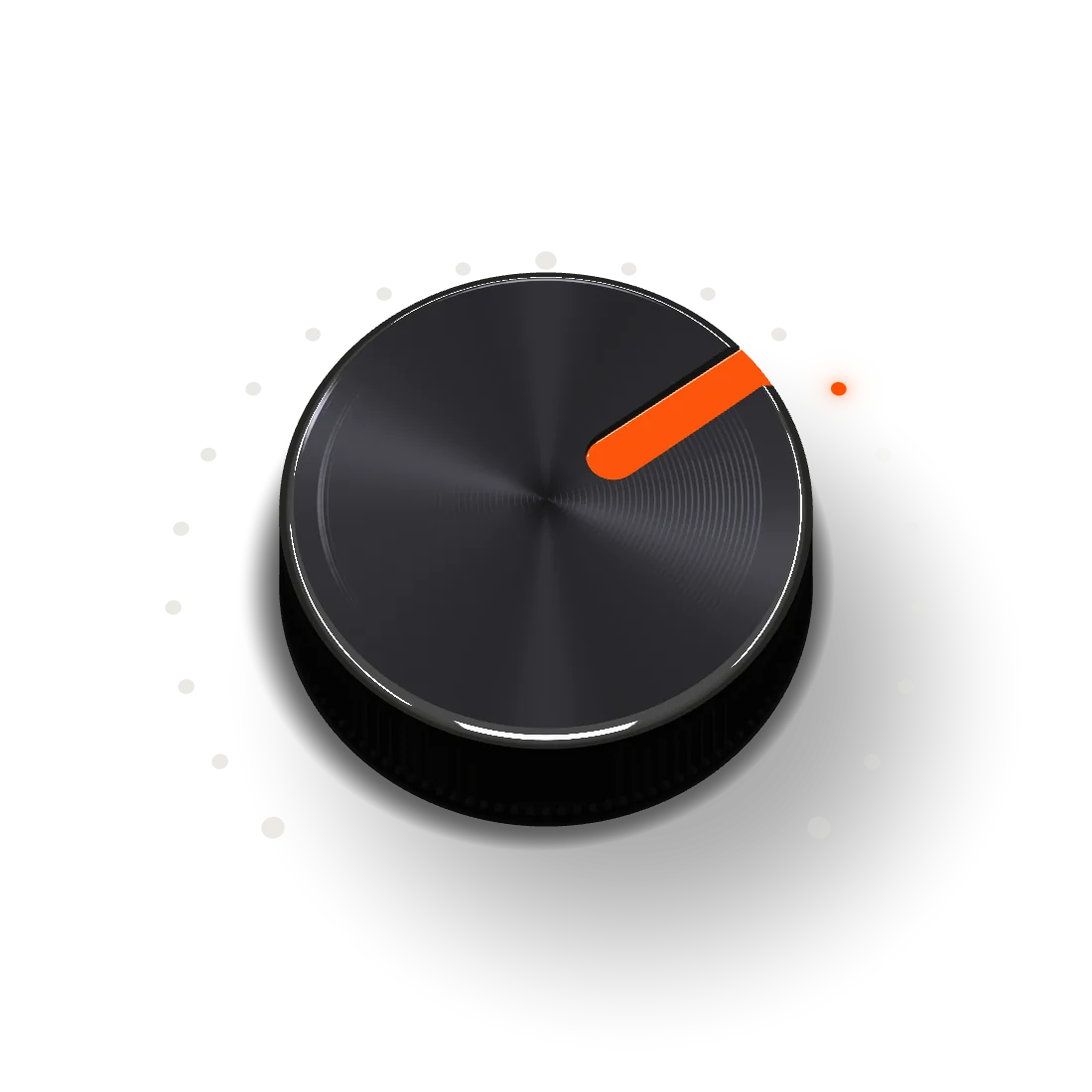
  1. 01 · INDEXMilled at 70% of the travel and filled with orange enamel. Orange means on.
  2. 02 · CHAMFERDiamond-cut. Every control in TONO is built like hardware.
  3. 03 · SCALE21 dots, lit up to the value – the scale of every knob in the app.
  4. 04 · KNURL110 flutes. Drag it, scroll it, or use the arrow keys.

One knob · nine modules

How your Mac sounds and looks. One faceplate.

The app

One window.
Every sound on your Mac.

No kernel extension, no virtual cables, no ten little apps. TONO sits between every app and your speakers and shapes what you hear – live, in memory, a few milliseconds behind the music.

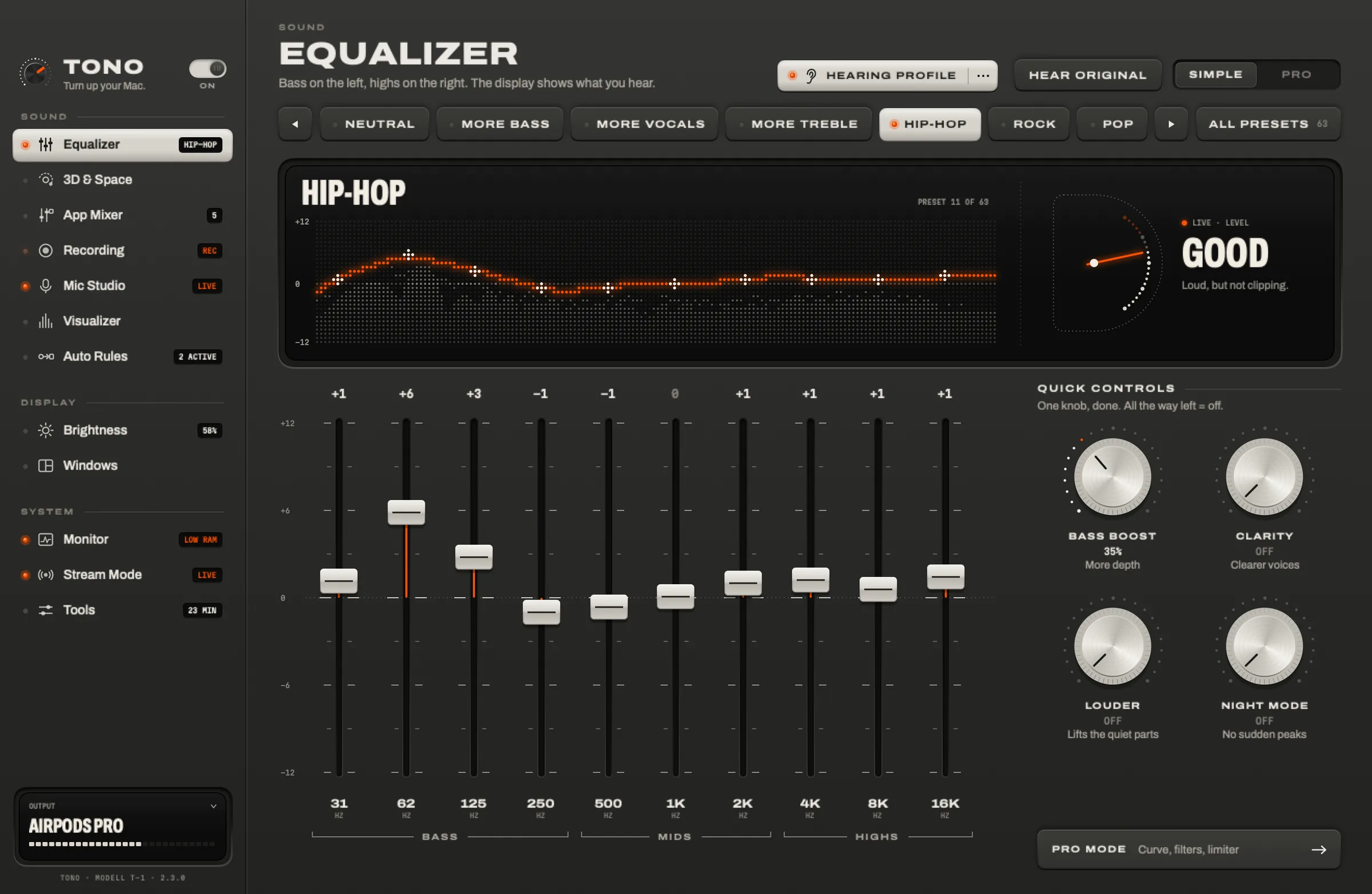
The TONO window: the Equalizer in Simple mode with a live curve and level display, ten faders and four quick-control knobs, and the sidebar listing every module.
Fig. 1TONO 2.3.0 · Equalizer, Simple. Light mode on your Mac? TONO is Alu. Dark? Graphit.

Sound · Equalizer · 3D & 8D · live in your browser

Hear it yourself.

Ten faders shape everything your Mac plays – Spotify, Safari, games, calls. Here they shape a loop composed in your browser. Press play, pull a fader, send it around your head.

Headphones on. 3D and 8D need them. Then hold Hear original to compare – that’s your Mac without TONO.

Fig. 2The music – eight bars of deep house – is synthesized live in your browser from oscillators and noise: no samples, nothing uploaded, nothing stored. The equalizer, 3D and 8D run on the Web Audio API as a sketch of TONO’s chain; the app does the same with its own engine, to every app on your Mac.

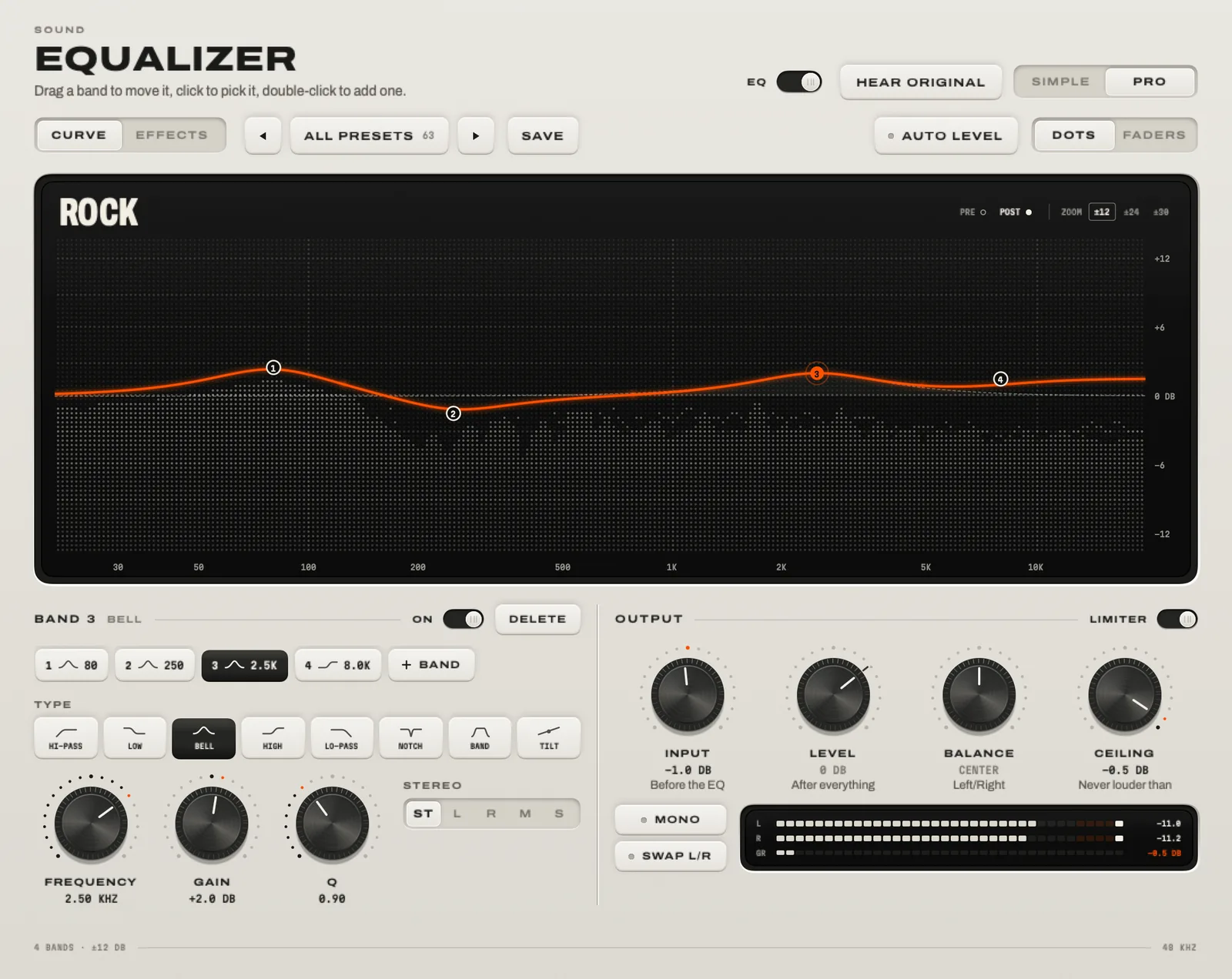
The Equalizer in Pro mode: a curve over the live spectrum with bands you drag, the band types, and knobs for input, level, balance and ceiling.In the appThe Equalizer in Pro mode

The system-wide equalizer in detail

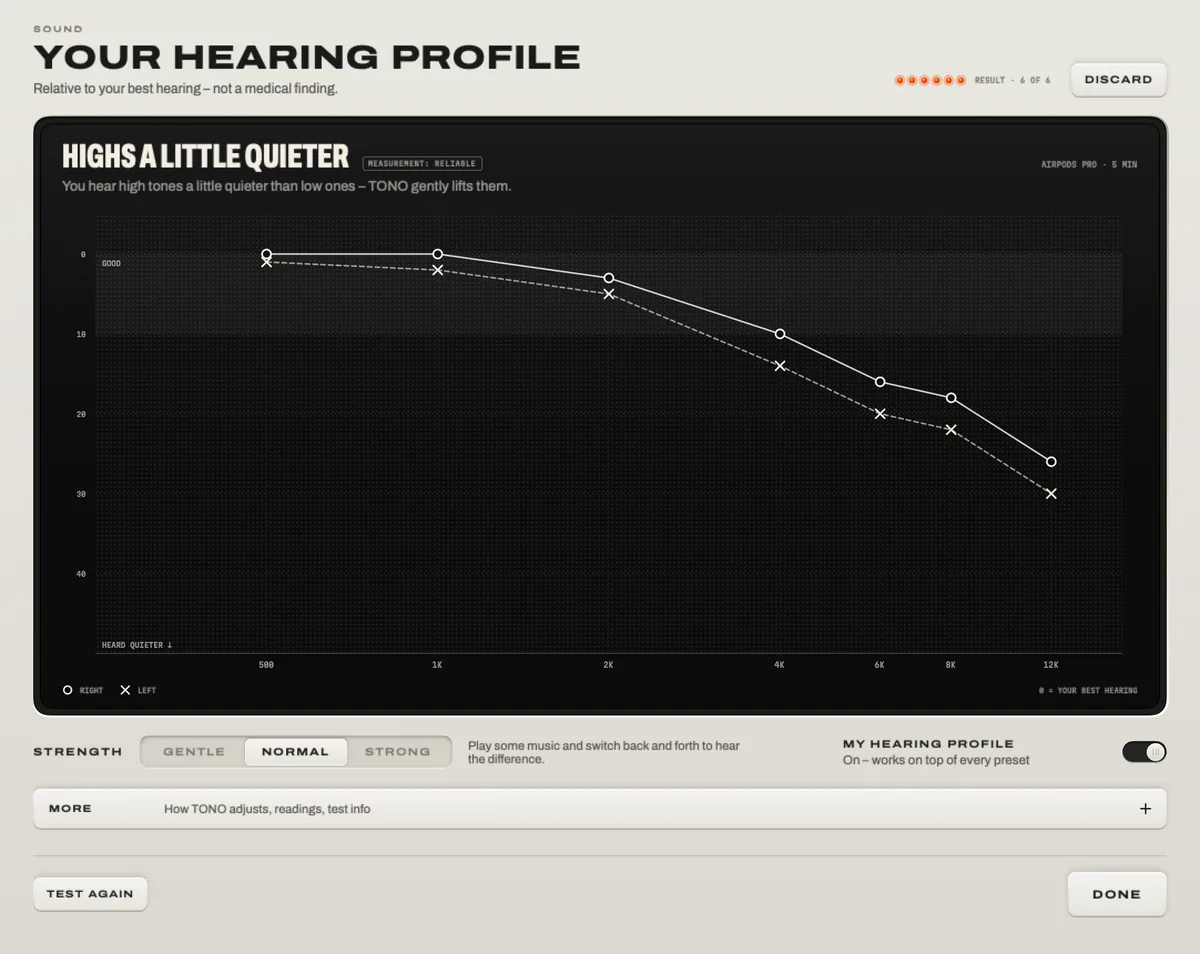
Your hearing profile in TONO after the test: a chart of both ears from 500 Hz to 12 kHz, the finding “Highs a little quieter”, and the strength switch Gentle, Normal, Strong.
Fig. 3The result in TONO: highs a little quieter on both ears, so TONO lifts them.

Sound · Hearing Profile Pro

Tuned to your ears.

Nobody hears quite like anyone else. With your headphones on, TONO plays short tones from 500 Hz to 12 kHz to each ear and finds how quietly you still hear them – in about five minutes. Your hearing profile then gently lifts what you hear less, on top of every preset.

500 Hz – 12 kHzEach earAbout 5 minGentle · Normal · Strong

Not a medical test: TONO measures against your own best hearing and uses the result only to shape the sound.

More about the hearing test

Sound · 3D & Space

Sound that leaves your head.

3D Surround puts virtual speakers in front of you. 8D Orbit sends the music around your head – on a circle, a pendulum, a figure 8.

Sound · Head tracking

Turn your head. It stays put.

With AirPods Pro or Max, TONO follows your head. Turn it, and the music stays where it is – like real speakers in a real room.

3D Surround8D Orbit4D Impact6 rooms + dryHead tracking

Best with headphones.

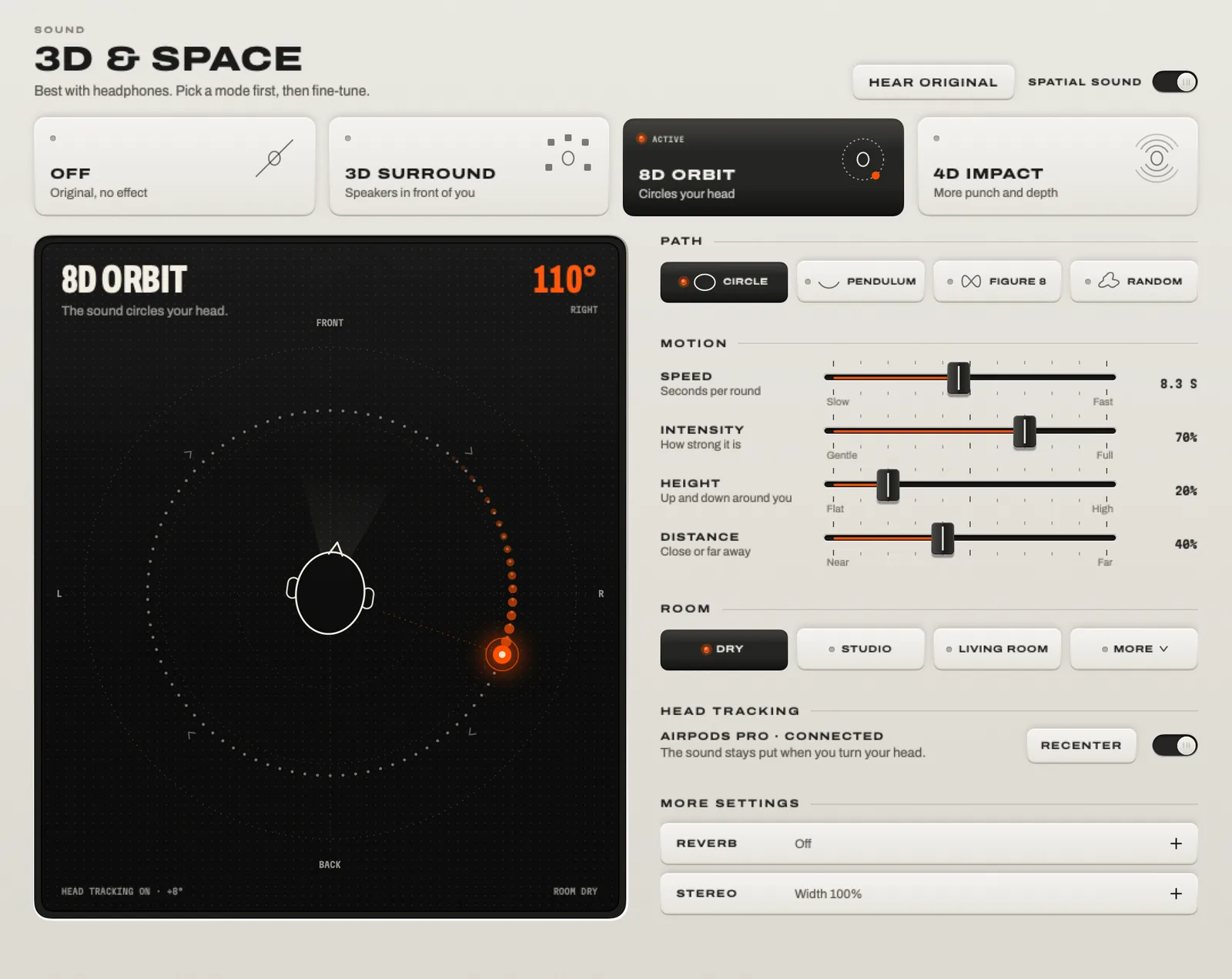
3D & Space: the modes Off, 3D Surround, 8D Orbit and 4D Impact, the stage with the orbiting source, and the path, motion, room and head-tracking settings.In the app3D & Space in TONO

More about 3D and 8D sound

Sound · App Mixer

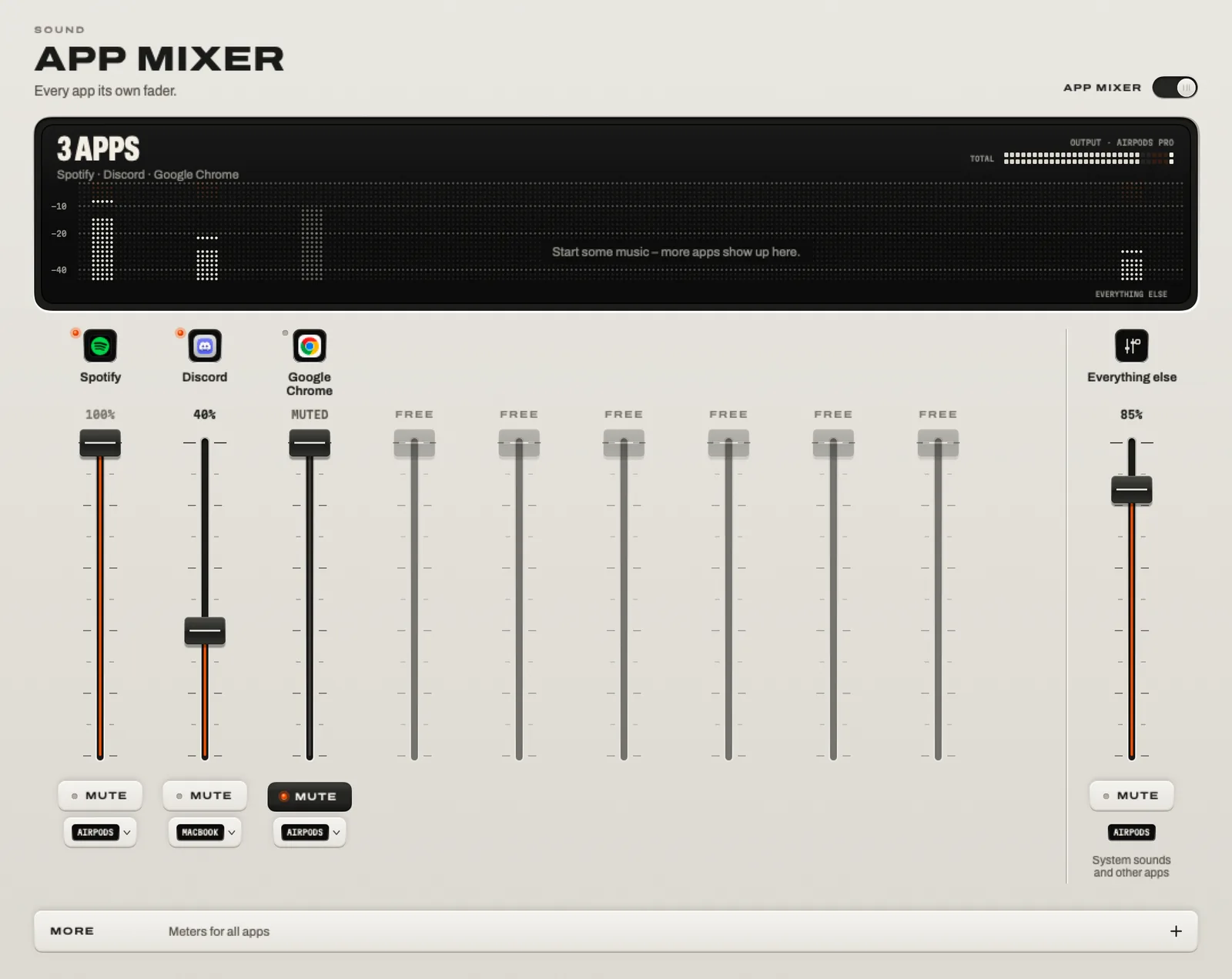
A fader for every app.

Discord quieter than the game. Chrome muted. Spotify all the way up – on the speakers, while the call stays in your headphones.

Volume & mute per appAn output per appRemembered

Fig. 4Four strips of the App Mixer. Play the demo, and the loop’s four tracks become four apps.

The App Mixer: a fader, a mute key and an output for Spotify, Discord and Google Chrome, and one for everything else.In the appThe App Mixer in TONO

More about per-app volume

Sound · Recording

Hit record.
Keep it all.

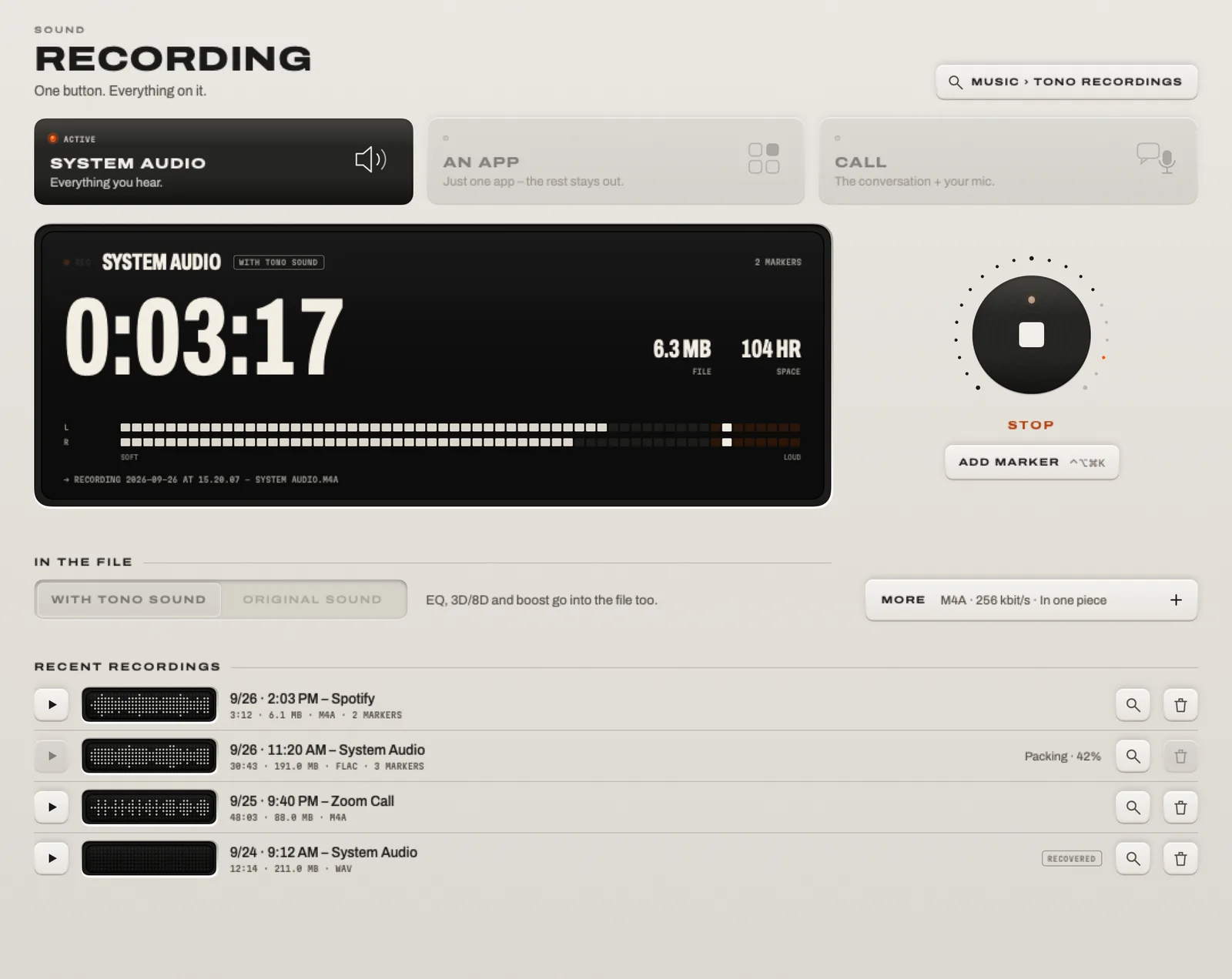
Record what your Mac plays – everything, one app, or a call with you on the left and everyone else on the right. Straight to your Music folder.

M4A · WAV · FLACMarkers on a keySplit every 30/60 minCrash-safe

Fig. 5Press REC: the next ten seconds of the demo become a file on your Mac.

Recording: system audio running with its level meters, the stop and marker keys, and the list of recent recordings.In the appRecording in TONO

More about recording system audio

Sound · Mic Studio

Sound like a studio. Anywhere.

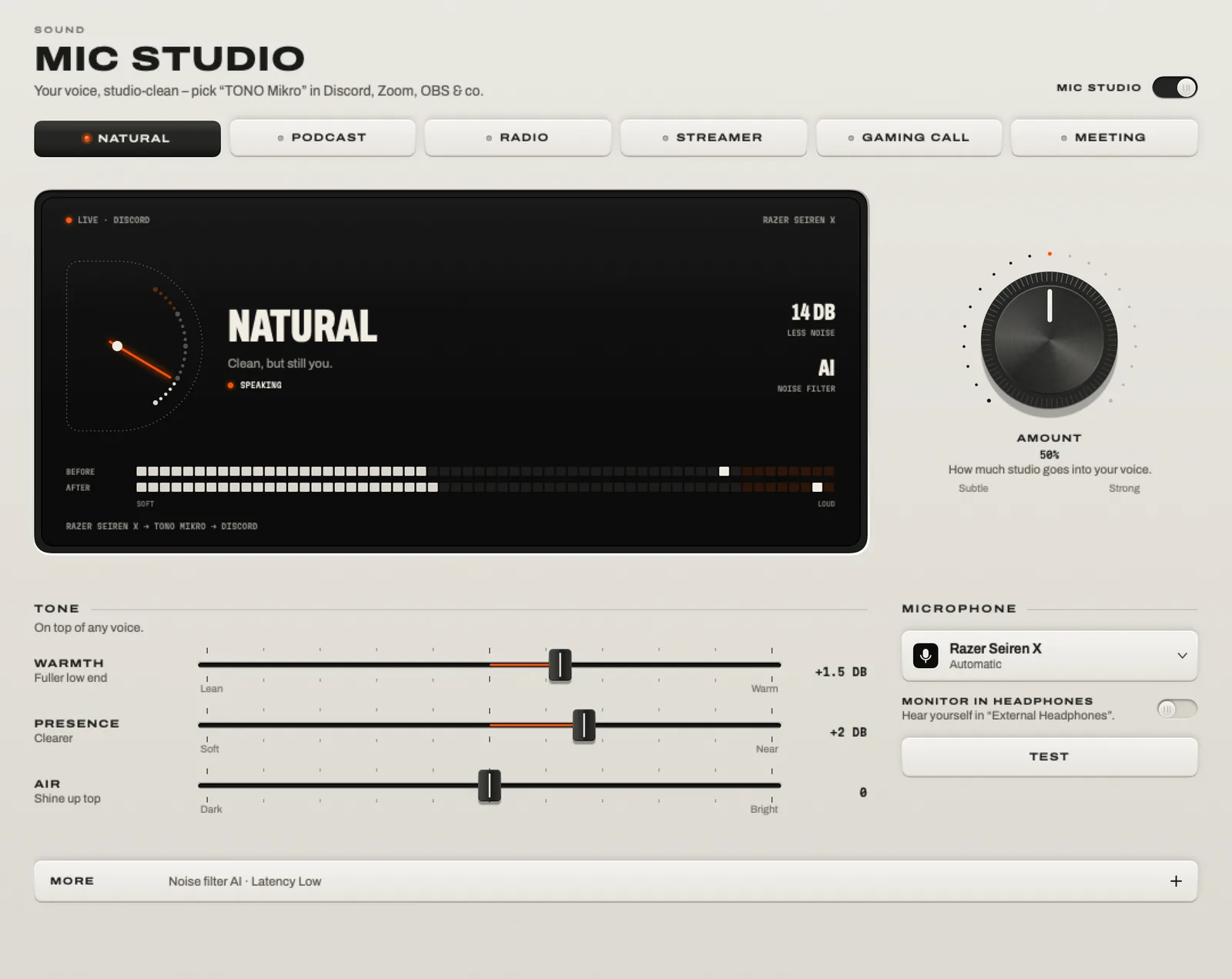
TONO cleans up your microphone live and passes it on as a new mic, TONO Mikro. Pick it in Discord, Zoom, OBS or the browser – the keyboard, the fan and the street fall away.

AI noise filter, on device6 voicesControl Option Command M mutes any mic

Fig. 6Turn up STUDIO and the noise floor falls away.

Mic Studio: the six voices, the display with your voice before and after, the Amount knob, the tone sliders and the microphone.In the appMic Studio in TONO

More about mic noise suppression

Sound · Visualizer

A light show, straight from the signal.

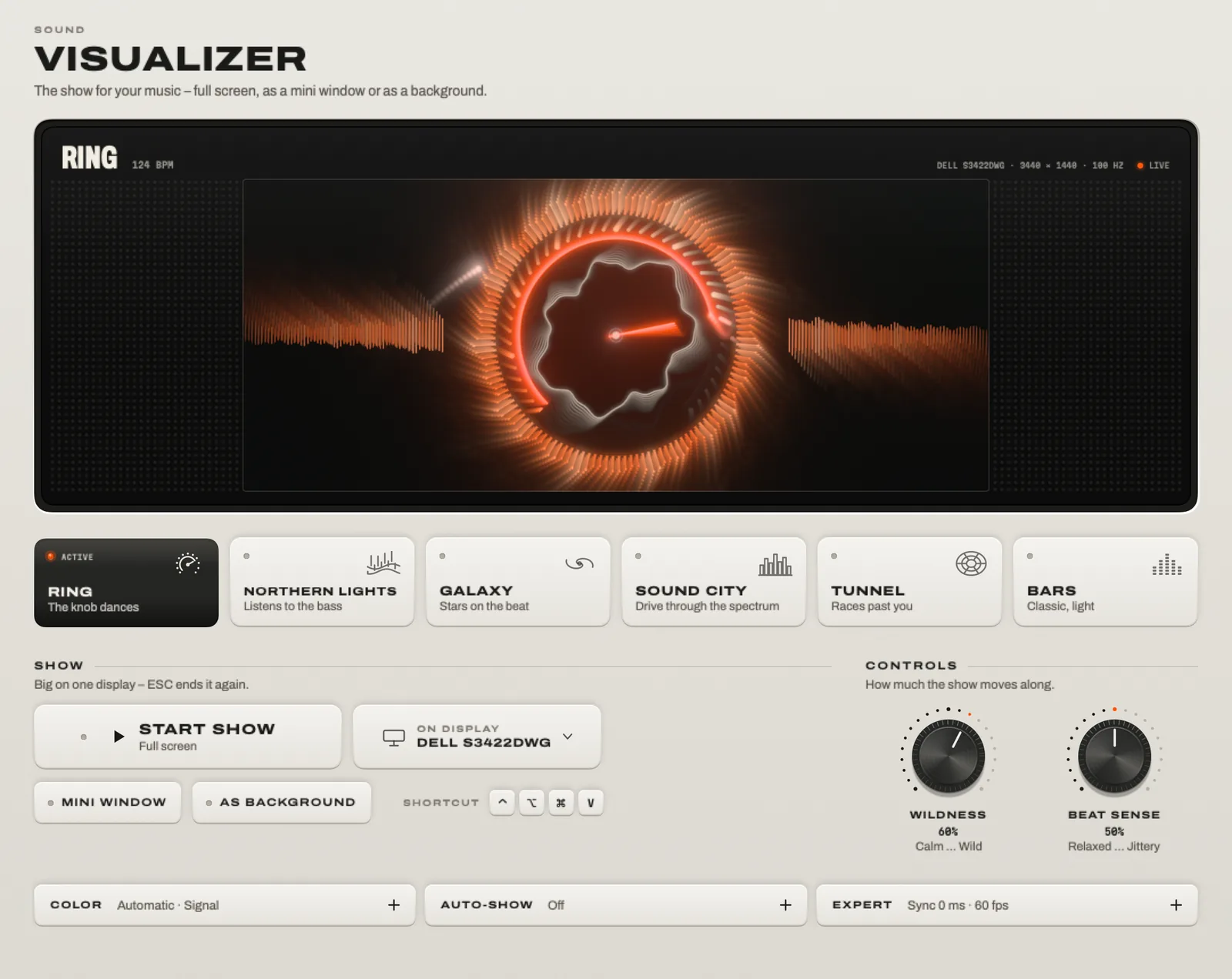
No microphone. TONO hears the kick, the snare and the drop in what it plays and draws the show on the beat – Bluetooth delay included.

6 looks7 themesFull screenMini windowWallpaper

The Visualizer: the Ring look in the preview, the six looks, and the show and control settings.In the appThe Visualizer in TONO

More about the audio visualizer

Display · Brightness

Darker than dark.

Every screen on one slider – external monitors with real hardware brightness where they support DDC/CI, and down to 85% darker than the lowest step macOS allows. Then add warmth, even without Night Shift.

More about dimming external monitors

Display · Windows

Windows on a key.

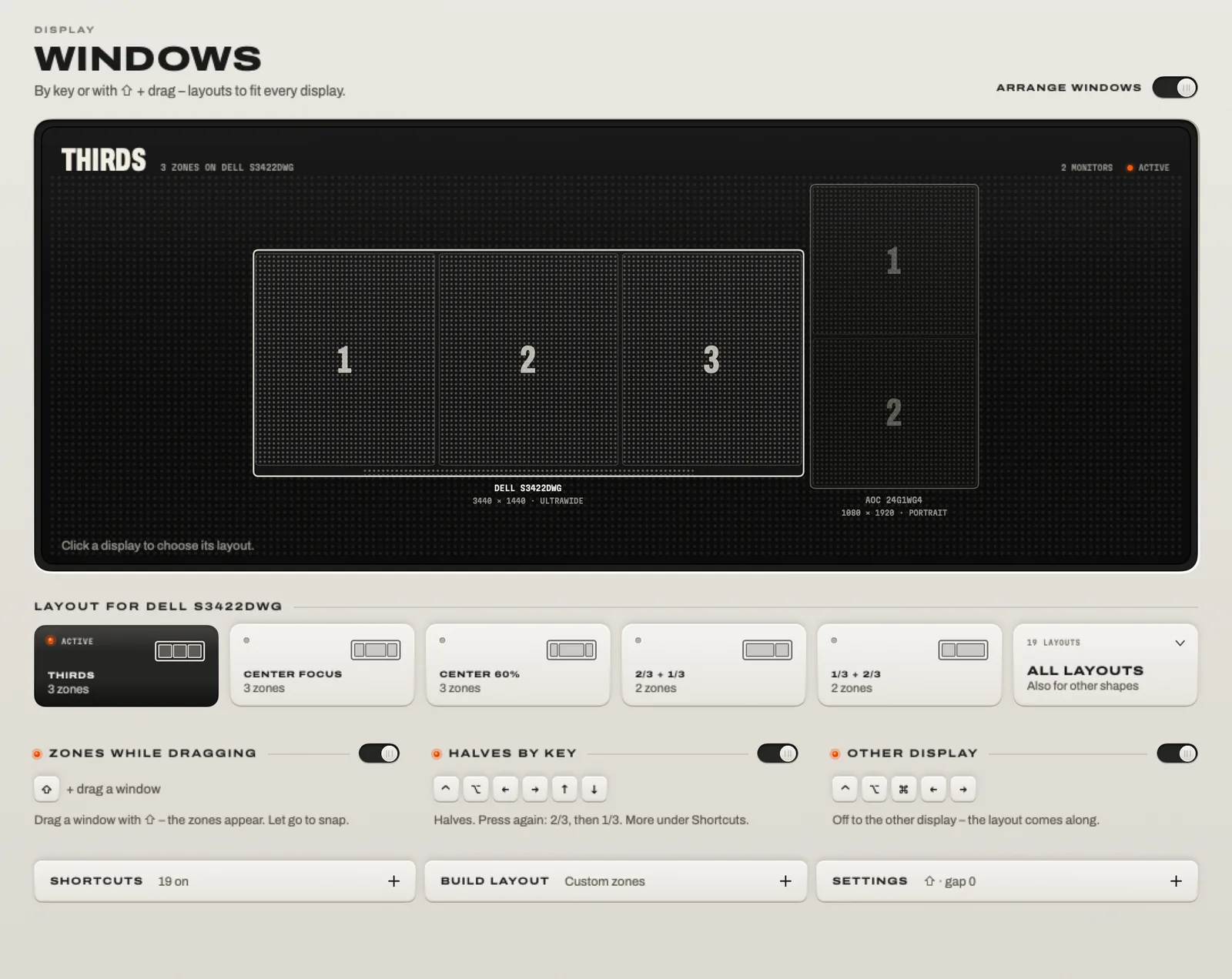
Halves, thirds, corners, the next display. Rectangle-style shortcuts, or hold Shift while you drag and drop into your layout’s zones. Your old shortcuts come along.

Control Option and the arrow keysLayouts per displayPortrait too

Windows: a display split into thirds, the layouts for it, and switches for zones while dragging, halves by key and the other display.In the appWindows in TONO

More about window snapping

System · Tools

Eight little apps
you won’t need anymore.

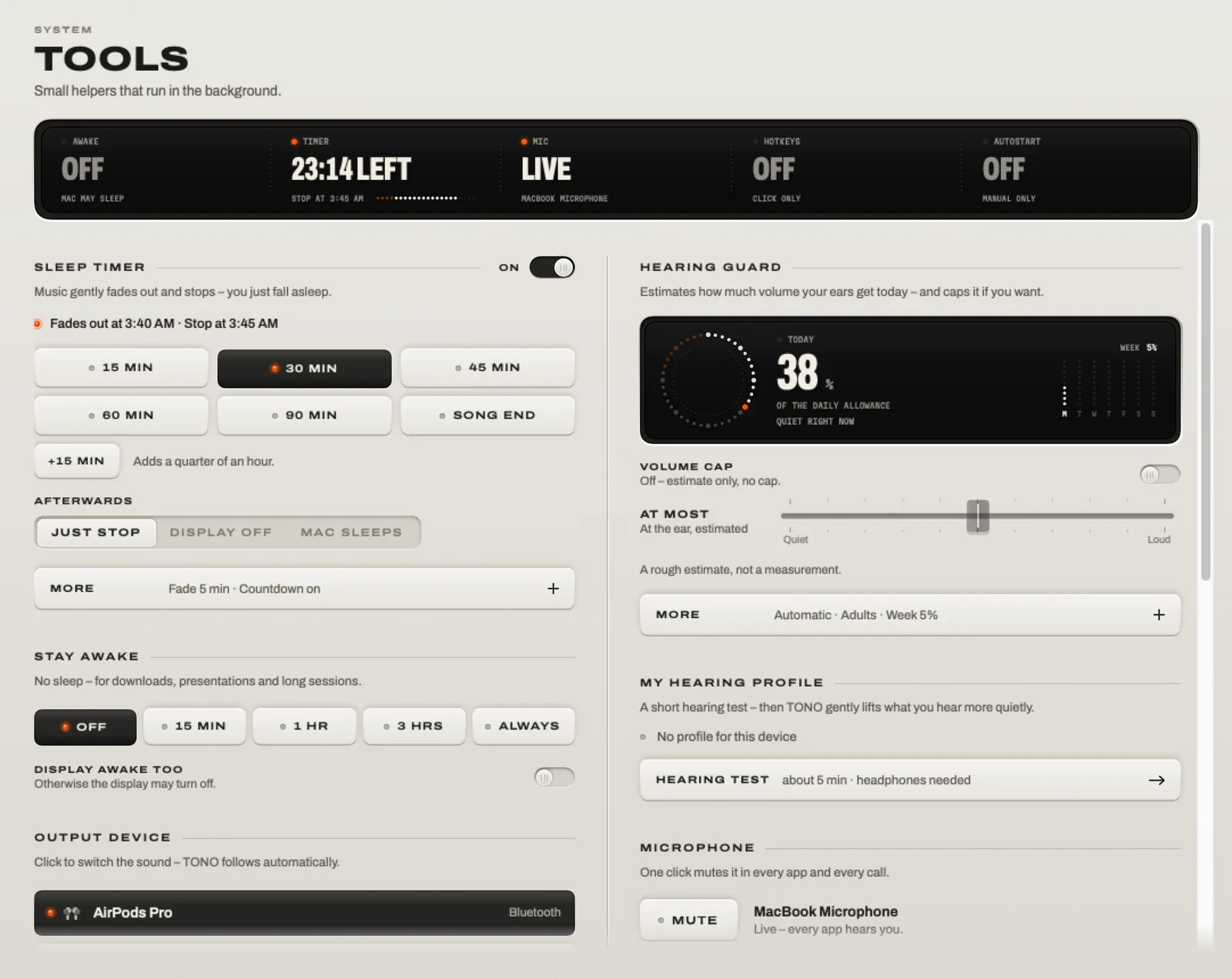
The helpers that usually come as separate menu-bar apps – built in, on the same faceplate, asleep until you need them.

Tools: a status display for Stay Awake, the sleep timer, the microphone, hotkeys and autostart, then the running sleep timer, Hearing Guard, Stay Awake and Mic Mute.In the appTools in TONO
  • 00:45Fading out

    Sleep Timer Pro

    15 to 90 minutes or the end of the song. The music fades, the player pauses, the Mac sleeps.

  • RelaxedCPU 12% · RAM OK

    Monitor Pro

    One word instead of twenty graphs: relaxed, low RAM, hot, disk full – and who’s to blame.

  • AirPods in → 3D onRule in effect

    Auto Rules Pro

    Headphones in, a call starts, the sun sets: TONO switches sound, 3D and brightness – and puts them back.

  • 62%of today’s sound dose

    Hearing Guard Free

    Estimates today’s dose for your ears (WHO/ITU) and caps the volume if you want.

  • Hi-FiAirPods Pro · 48 kHz

    AirPods Quality Free

    Keeps AirPods in hi-fi instead of call quality when an app grabs their microphone.

  • 1 hScreen stays on

    Stay Awake Free

    15 minutes, an hour, three hours or until you say so – with the screen on if you like.

  • MutedControl Option Command M · every app

    Mic Mute Free

    Mute the current microphone in every app at once – even mics without a mute switch.

  • Control Option Command+ one key

    Hotkeys Free

    One combination for everything important, one practically no other app uses. Stream Deck and Shortcuts too.

For DJs, streamers & creators

Go live in one click.

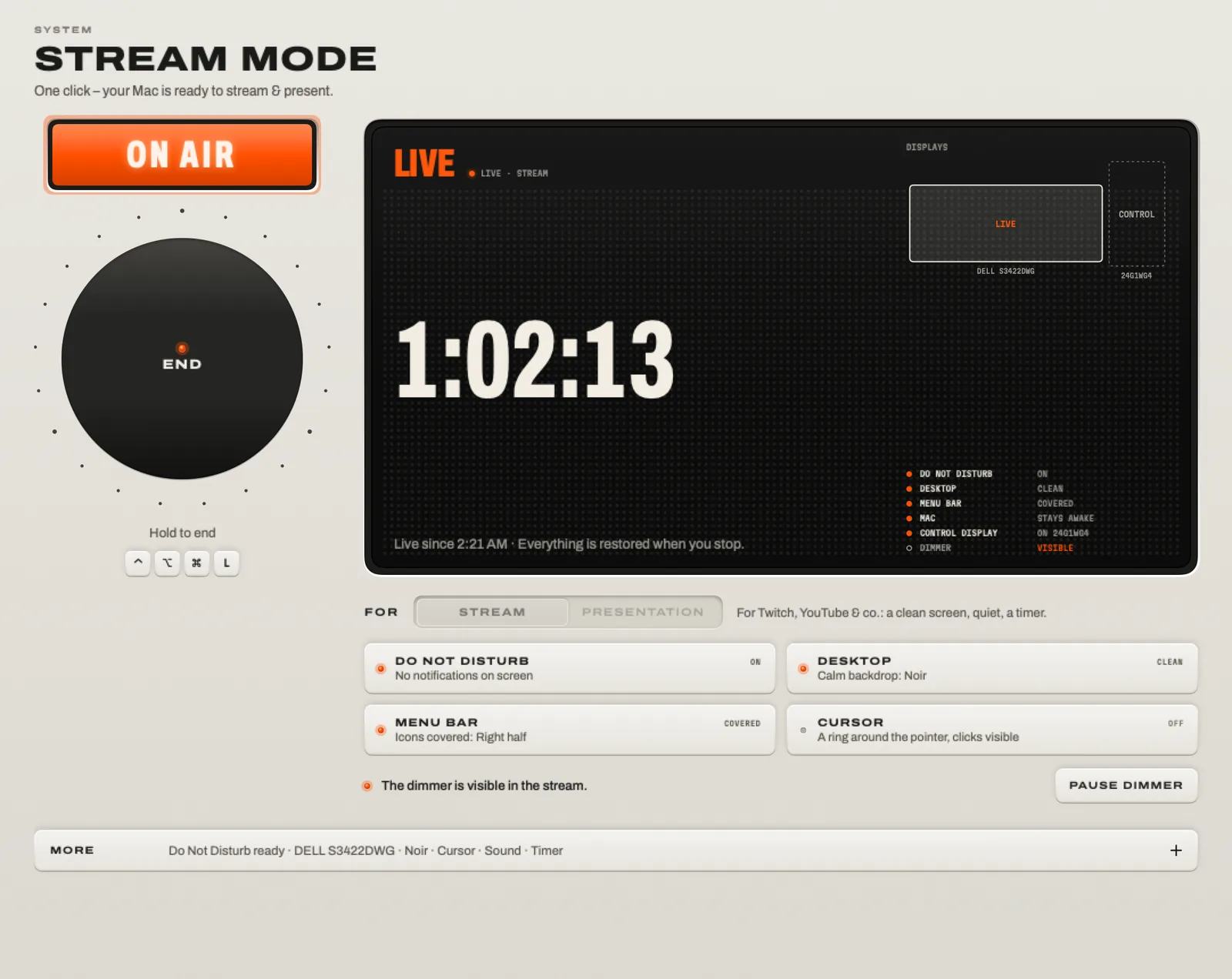
Stream Mode gets your Mac ready: your voice sounds like a studio, the desktop is clean, nothing pops up – and End puts everything back. Even after a crash. Next to it, record the set lossless and put the light show on the second screen.

Stream Mode, live: the ON AIR key, the End knob, the time on air and the list of everything it switched.In the appStream Mode in TONO

Ready · press the lamp

0:00:00

  • Do Not DisturbOn
  • DesktopClean
  • Menu barCovered
  • MacStays awake
  • OBS · DiscordWithout TONO

Fig. 7Press the lamp. Stream Mode switches five things for you – and puts them back.

Patch sheet: a typical stream Your microphone runs through Mic Studio into TONO Mikro, which OBS and your Discord call pick up. Spotify plays on the speakers and Discord in your headphones through the App Mixer, and Recording captures your DJ app as set.flac. SourcesTONOGoes to Microphone Spotify Discord Your DJ app Mic StudioTONO Mikro App MixerPer-appoutputs RecordingEverything OBS Discord call Speakers Headphones set.flac
Fig. 8Patch sheet of a typical stream. No cables, no loopback app, no virtual output to pick.
  1. On Air in one click. Do Not Disturb, a clean desktop, the menu bar covered, the Mac awake, a ring around the cursor.
  2. Your studio voice, everywhere. Pick TONO Mikro in OBS, Discord, Zoom or the browser.
  3. Record the set. Everything or one app, as WAV or FLAC, markers on a hotkey, split every 30 or 60 minutes.
  4. Every app its own output. The music on the speakers, Discord in your headphones.
  5. No echo on stream. OBS, Discord, Zoom and Teams play without TONO while you’re live.
  6. Visuals on the beat, full screen on the second display or behind your windows.
  7. Stream Deck ready. tono://stream/toggle, global hotkeys and Shortcuts.
  8. End puts it all back, even after a crash: notifications, desktop, sleep, your mic.

Under the hood

System-wide.
No kernel extension.

Since macOS 14.2, Core Audio can hand an app the sound of other apps: a process tap. TONO uses it – Apple’s own way in. No kernel extension, no BlackHole, no virtual output to pick. Install it, allow it once, done.

Every appSpotify · Safari · Music · games · callsThey play as always.
macOS · Core AudioProcess tapHands TONO the sound, and mutes the original only while TONO runs.
TONO · in memoryEqualizer · 3D & 8D · LimiterA few milliseconds. Nothing touches the disk.
Your outputAirPods · speakers · USB · HDMISwitch devices, and TONO follows.

Fig. 9The signal path. The volume keys keep working; they sit after TONO.

Live, in memory

The sound is processed as it plays, with a few milliseconds of latency, and goes straight to your current output. Nothing is recorded unless you press a button.

Safe to quit

Apps are muted only while TONO taps them. If TONO quits – or crashes – macOS unmutes them at once. You never get stuck in silence.

Nothing else to install

No driver for the sound itself. The one exception is Mic Studio: its virtual mic needs a small audio driver, installed only if you set it up.

How TONO works, in detail

Privacy

Nothing is recorded unless you press a button.

macOS calls the permission TONO needs “Screen & System Audio Recording”. That’s just the name: TONO processes the sound live and records only when you say so.

  • 01

    Your sound stays on your Mac.Processed in memory, straight to your headphones or speakers.

  • 02

    Recordings only on your command.Saved as files on your Mac. Nothing is uploaded.

  • 03

    The microphone opens only when needed.For a call recording or Mic Studio – and macOS shows its orange dot.

  • 04

    Your settings stay on this Mac.Hearing profile, rules and history. Head movement is used live and never stored.

  • 05

    No account, no analytics, no ads.In the app and on this website, which sets no cookies and loads nothing from anyone else.

Specifications

TONO · Modell T-1

Version 2.3.0macOS 15+ · Apple siliconEN · DE

System
macOS 15 Sequoia or later · Apple silicon (M1 or later) · English and German
Audio path
Core Audio process taps · no kernel extension · a few milliseconds of latency · follows your output
Equalizer
Simple: 10 bands, 4 quick-control knobs, up to +12 dB · Pro: up to 24 bands, bell, shelf, tilt, notch, band pass, cuts to 96 dB/oct, L/R and mid/side, auto-gain, output up to +18 dB · a look-ahead limiter
Presets
60+, loudness-matched · genres, devices, situations · save, share, import · AutoEQ headphone curves
3D & Space
3D Surround · 8D Orbit on circle, pendulum, figure 8, drift · 4D Impact · 6 rooms + dry · head tracking with AirPods Pro and Max
Hearing Profile
Hearing test with headphones, 500 Hz to 12 kHz, each ear, about 5 minutes · gentle, normal or strong, on top of every preset · not a medical test
App Mixer
Volume, mute, meter and output per app · remembered while the app is closed · three strips in the menu bar
Recording
M4A, WAV, FLAC · system, one app or a call (mixed or split L/R) · markers · split every 30 or 60 minutes · crash-safe files
Mic Studio
Virtual mic “TONO Mikro” · 6 voices · AI noise filter (Apple voice isolation, on device) · gate, compressor, de-esser, limiter
Visualizer
6 looks, 7 color themes · full screen, mini window, live wallpaper · flashes limited, follows Reduce Motion
Display
External monitors via DDC/CI · down to 85% below the minimum · warmth · scenes · window snapping with layouts per display
Privacy
No account · no analytics · no ads · processing on your Mac
Price
Free to keep · Pro from €3.99 a month, €29 a year or €79 once · one day of Pro free
Pricing

Free to keep.
Pro for everything.

Free keeps the equalizer with its 60+ presets, brightness and the everyday tools – for good. Pro adds the rest: 3D and 8D (the 3D and 8D presets included), your hearing profile, the App Mixer, recording, Mic Studio, the visualizer, windows and Stream Mode.

Free

No card · No account
€0Forever

The equalizer with 60+ presets, brightness for all your displays and the everyday tools.

  • Equalizer · Simple10 faders, quick knobs, the live display
  • 60+ presetsSave, share and import your own
  • BrightnessEvery display, below the minimum, warmth
  • ToolsHearing Guard, AirPods Quality, Stay Awake, Language

TONO starts with all of Pro for one day on each Mac. Afterwards TONO carries on as Free – nothing to cancel.

Download free

Pro Every module

€29per year

Everything in Free, plus:

  • Equalizer · Pro
  • 3D & Space
  • Hearing Profile
  • App Mixer
  • Recording
  • Mic Studio
  • Visualizer
  • Auto Rules
  • Windows
  • Stream Mode
  • Monitor
  • Sleep Timer
Buy TONO Pro

One license is for one Mac. To move it, sign that Mac out in TONO.

All prices include VAT. Checkout, payment and invoice by Lemon Squeezy, our reseller (merchant of record).

Compare in detail What each module does, Free and Pro
Free and Pro compared
ModuleFreePro
Equalizer · Simple10 faders, quick knobs, the live displayIncludedIncluded
60+ presetsSave, share and import your ownIncludedIncluded
BrightnessEvery display, below the minimum, warmthIncludedIncluded
Equalizer · ProUp to 24 bands, curve editor, mid/sideNot includedIncluded
3D & Space3D & 8D sound, rooms, head trackingNot includedIncluded
Hearing ProfileA hearing test tunes the sound to your earsNot includedIncluded
App MixerVolume, mute and output per appNot includedIncluded
RecordingSystem audio, one app or a callNot includedIncluded
Mic StudioStudio voice as the virtual mic TONO MikroNot includedIncluded
VisualizerSix looks, full screen, mini window, wallpaperNot includedIncluded
Auto Rules“When … then …”, with undoNot includedIncluded
WindowsSnap by shortcut or drag, layouts per displayNot includedIncluded
Stream ModeReady to go live in one clickNot includedIncluded
MonitorWhat slows your Mac down, in one wordNot includedIncluded
Sleep TimerThe music fades out while you fall asleepNot includedIncluded
ToolsHearing Guard, AirPods Quality, Stay Awake, LanguageIncludedIncluded

FAQ

Good to know.

Anything missing? Write to us – a person answers.

What do I need?

A Mac with Apple silicon (M1 or later) and macOS 15 Sequoia or newer. TONO speaks English and German.

How does system-wide sound work without a driver?

Since macOS 14.2, apps can tap the audio of other processes through Core Audio. TONO taps what plays on your output, runs it through its signal chain and sends it to your device – in memory, with a few milliseconds of latency. The taps mute the original only while TONO runs; if it quits or crashes, macOS restores the sound instantly.

No kernel extension and no virtual output device are involved. Only Mic Studio installs a small audio driver, and only if you set it up. How TONO works explains the whole signal path.

Which permissions does TONO ask for?

One is needed: Screen & System Audio Recording, when you first switch the sound on. That’s the name macOS uses – TONO processes the sound live and records only when you press record.

Four more are optional and asked only when you use the feature:

  • Microphone – call recording and Mic Studio.
  • Head movement – head tracking with AirPods.
  • Accessibility – for the Windows module, to move and resize other apps’ windows. TONO reads position and size only, never content.
  • Location – more precise sunset times for Auto Rules. Without it, TONO uses your time zone.
Does TONO record anything in the background?

No. Recording starts only when you press the record key or its hotkey, and the files stay on your Mac. The microphone opens only for a call recording or while an app reads TONO Mikro – macOS shows its orange dot whenever it’s on.

Do I need headphones for 3D and 8D?

For the full effect, yes: 3D and 8D render the sound for two ears, and speakers mix the two sides in the room before they reach you. Any headphones work; with AirPods Pro or AirPods Max, head tracking keeps the sound in place when you turn your head. The equalizer, the App Mixer and everything else work just as well on speakers.

Which headphones and speakers work?

Anything on your output: AirPods and other Bluetooth headphones, the MacBook speakers, USB DACs and interfaces, HDMI and DisplayPort. Apps that you send to another device inside the app itself stay untouched – with the App Mixer, you can route apps from TONO instead and keep your sound. An app that records from the device TONO plays to – a call on your AirPods’ or headset’s own mic, say – plays untouched, so nothing can loop back.

Why isn’t TONO in the Mac App Store?

TONO installs an audio driver for Mic Studio’s virtual microphone and uses system interfaces that App Store apps can’t – for example for display brightness. So TONO comes straight from us.

What happens after the trial?

After one day TONO carries on as TONO Free: the equalizer in Simple mode with its 60+ presets, brightness and the Tools keep working (the 3D and 8D presets then play their EQ, without the spatial part). Buy Pro any time to unlock the rest again.

How does the license work?

One license is for one Mac. To move it, sign that Mac out in TONO. After buying you get a license key by email; enter it in TONO. Subscriptions renew automatically and can be canceled any time – Pro keeps working until the end of the period you paid for. The lifetime license is paid once and includes all updates. Pro checks the license about once a week and keeps working offline for 30 days after the last check (60 days with a lifetime license).

Receipts, license keys and cancellation: your orders at Lemon Squeezy.

Who handles the payment?

Lemon Squeezy, our reseller and merchant of record. They run the checkout, take the payment, charge the right VAT and send the invoice. We never see your card details.

Does the demo on this page send anything?

No. The music is composed and played by your browser, the equalizer and 3D run there too, and a recording from the demo is saved straight to your Mac. This website sets no cookies and loads nothing from third parties.

How do I uninstall TONO?

Drag TONO to the Trash. If you set up Mic Studio, remove TONO Mikro first under Mic Studio → More → Technical. Your recordings stay in your Music folder on purpose – they’re yours.

Turn up your Mac.

Download free. All of Pro for one day. No account.

Version 2.3.0macOS 15+Apple silicon