Feature · Sound
A hearing test that tunes your Mac to your ears
No two people hear alike, and hearing changes with age. TONO’s hearing test plays short tones to each ear through your headphones and finds how quietly you still hear them, from 500 Hz to 12 kHz – in about five minutes. Your hearing profile then gently lifts what you hear less, per ear, on top of every preset and in every app. It’s not a medical test: TONO measures against your own best hearing and uses the result only to shape the sound.

Hearing Profile
5 min
Seven tones per ear, 500 Hz to 12 kHz, with your headphones.
TONO 2.3.0macOS 15+Apple siliconProUpdated
How the test works
- Headphones on, volume once. Set a quiet but clear level with one big slider. Other apps go silent during the test, and TONO puts your volume back afterwards.
- Listen and press Space. You hear short beeps – sometimes left, sometimes right, sometimes high, sometimes low – and press Space as soon as you hear one. Now and then there’s no tone at all, which keeps the test honest.
- TONO adapts. For seven frequencies on each ear, each answer decides how loud the next tone is, and TONO stops once it knows your threshold to about 3 dB. Most tests take about four minutes of listening.
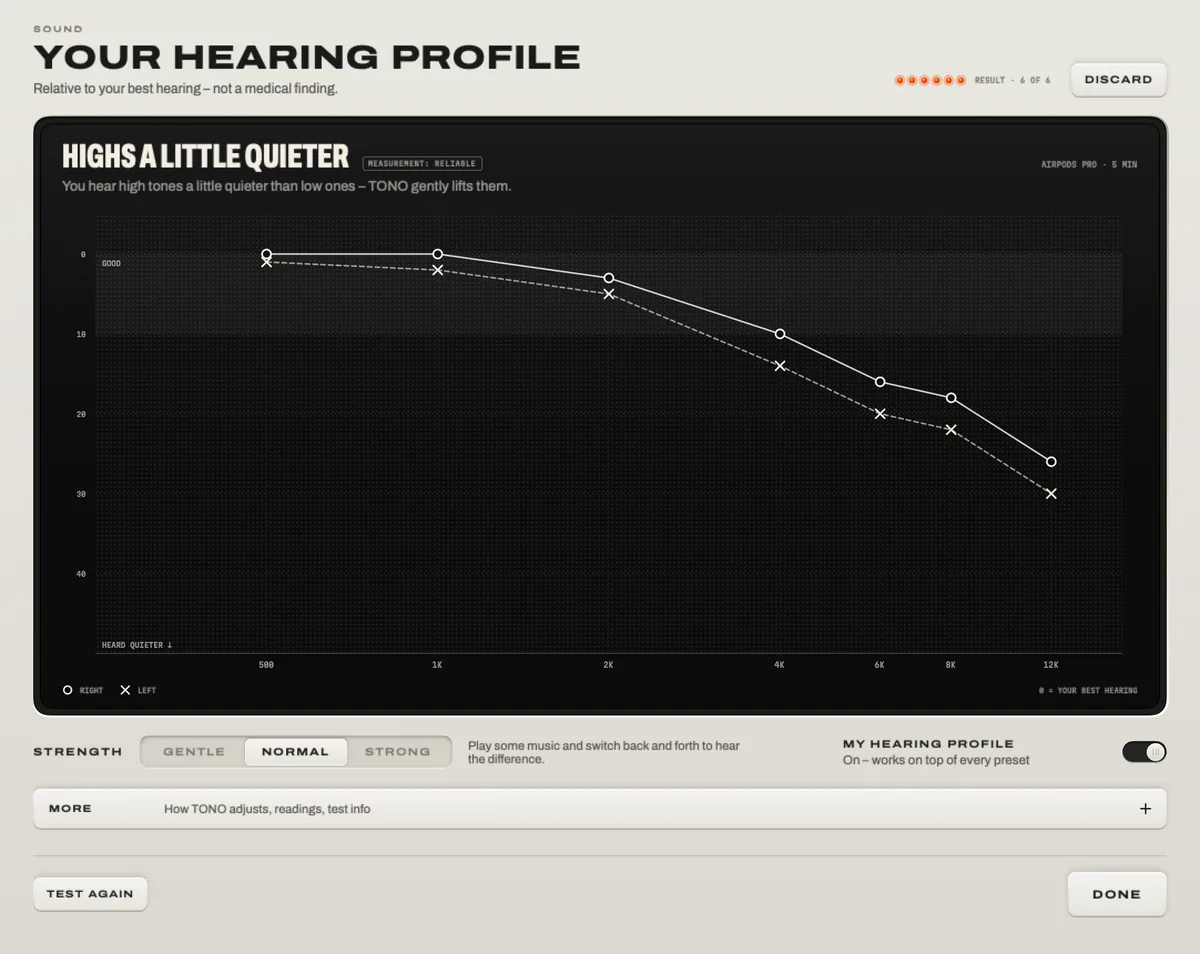
- Your result. A chart of both ears and a finding in plain words, such as “Highs a little quieter”. Choose Gentle, Normal or Strong, and hear the difference before you save.
Why it measures relatively
A clinical hearing test needs calibrated equipment. TONO doesn’t pretend to have it: it compares every tone with a reference curve of normal hearing (ISO 226) and then with your own best hearing, so the headphones, the volume and the room cancel out. What remains is what matters for listening – the shape across frequencies and the difference between your ears. The tones pulse and warble slightly, which keeps them steady in the ear canal and easy to tell from ringing in the ears.
What the profile does
- A gentle correction per ear, applied after TONO’s other effects so it reaches your ears exactly as measured.
- It works on top of any preset and in every app, and you switch it on and off in the Equalizer, in Tools or from the menu bar.
- It belongs to the headphones you tested with, so your AirPods and your studio headphones can each have their own.
Not a medical test
ImportantTONO’s hearing test is for tuning sound, not for diagnosing anything. If you notice a sudden change, ringing that doesn’t stop, or trouble following conversations, see a hearing professional.
To protect your hearing day to day, TONO’s free Hearing Guard estimates today’s sound dose for your ears (following WHO and ITU guidance) and can cap the volume.
At a glance
Hearing Profile · TONO 2.3.0
- Test
- With headphones · 7 frequencies from 500 Hz to 12 kHz · each ear · about 5 minutes
- Method
- Pulsed warble tones · adaptive (Bayesian) threshold tracking · silent catch trials · relative to your own best hearing
- Profile
- Per ear · Gentle, Normal or Strong · on top of every preset · per headphones
- Privacy
- Stays on your Mac · never uploaded
- Plan
- TONO Pro · Hearing Guard is Free
Free or Pro
The hearing test and your hearing profile are part of TONO Pro – €3.99 a month, €29 a year or €79 once, and TONO starts with one day of Pro on each Mac. Take the test in the trial; the profile works as long as Pro does.
Questions
Can I take a hearing test on my Mac?
Yes, for tuning sound. TONO’s test runs with your headphones in about five minutes and gives you a hearing profile per ear. It isn’t a medical hearing test, which needs calibrated equipment and a professional.
Which headphones should I use?
The ones you listen with most. The profile belongs to the headphones you tested with; take the test again with other headphones to give them their own profile.
Is this like the hearing features of AirPods Pro?
The idea is similar – adjust sound to your hearing – but TONO’s profile lives on your Mac, works with any headphones and in every app, and sits on top of your equalizer presets.
Where is my result stored?
Only on your Mac, in TONO’s settings. It isn’t uploaded and isn’t tied to an account – TONO has none.
Turn up your Mac.
Download free. All of Pro for one day. No account.
Download for Mac Hear it first
Free to keepPro from €3.99 a monthmacOS 15+Apple silicon