Feature · Sound
A system-wide equalizer for your Mac
macOS has no equalizer for everything it plays: Apple Music’s EQ only changes Apple Music, Spotify’s only changes Spotify. TONO puts one equalizer in front of every app on your Mac – ten faders and 60+ presets in TONO Free, up to 24 bands with a curve editor in Pro. It works on any output and needs no kernel extension and no virtual audio device.

Equalizer
24 bands
Ten faders in Free. Up to 24 bands with a curve editor in Pro.
TONO 2.3.0macOS 15+Apple siliconFree + ProUpdated
How the equalizer reaches every app
TONO receives the sound of every app on your current output through a Core Audio process tap – the interface Apple added in macOS 14.2 for exactly this – runs it through its equalizer and sends it on to your speakers or headphones. Live, in memory, a few milliseconds behind the music. You don’t pick a virtual output, and nothing is installed into the system. If TONO quits, macOS gives every app its original sound back at once.
So the same curve shapes Spotify, Apple Music, YouTube in Safari or Chrome, Netflix, games, Zoom and FaceTime. Switch from the MacBook speakers to AirPods and TONO follows the output. One exception keeps feedback out: an app that records from the device TONO plays to – typically a call through your AirPods’ or headset’s own mic – plays untouched. The details are in How TONO works.
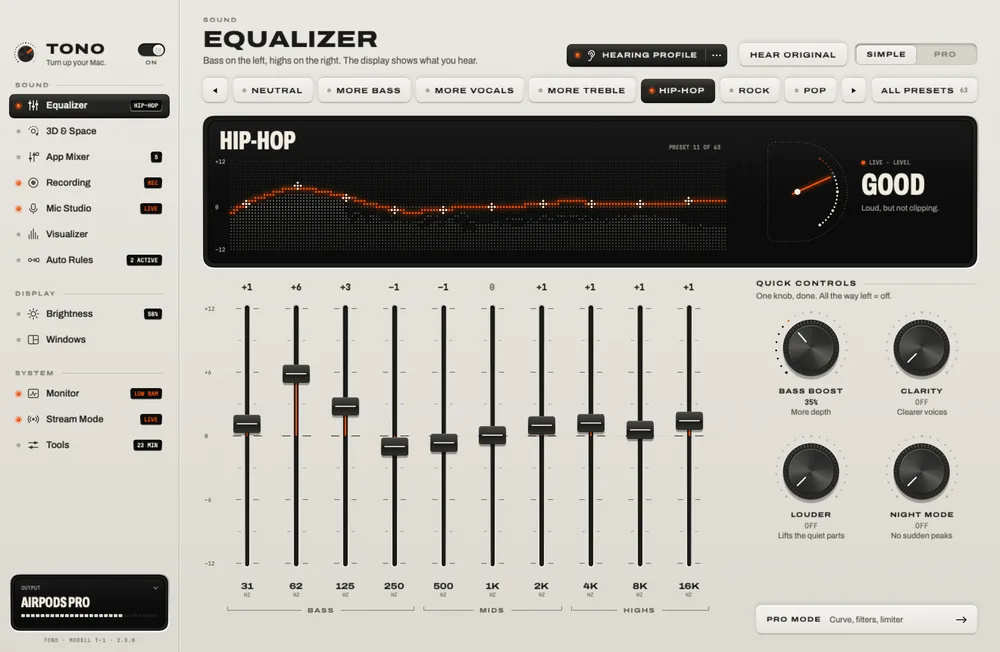
Simple: ten faders, four knobs, 60+ presets
Simple is the whole equalizer most people need, and it is part of TONO Free for good:
- Ten faders from the deep bass to the air, drawn as one live curve over the spectrum of what’s playing.
- Four quick controls: Bass Boost (“more depth”), Clarity (“clearer voices”), Louder (“lifts the quiet parts”) and Night Mode (“no sudden peaks”).
- 60+ presets for genres (hip-hop, classical, house …), devices (MacBook speakers, AirPods, iMac …) and situations (podcasts, calls, night), all loudness-matched so a preset changes the sound, not the volume.
- Louder than macOS: up to +12 dB for quiet speakers (up to +18 dB in Pro), with a look-ahead limiter – on by default – that catches the peaks before they clip.
- HEAR ORIGINAL: hold the key and you hear your Mac without TONO – the fastest way to know whether a curve really helps.
Pro: up to 24 bands and a curve you draw
Pro turns the display into a parametric equalizer. Drag bands directly on the curve, over the live spectrum, and give each one its own shape:
- Up to 24 bands of bell, low and high shelf, tilt, notch and band pass.
- Low and high cuts from 6 to 96 dB per octave.
- Per band left, right, mid or side – fix one ear, or widen the stereo image without touching the center.
- Auto-gain keeps a bass-heavy curve from simply getting louder, so you judge the tone, not the level.
The curve you see is computed from the same filter coefficients the audio runs through, so what you draw is what you hear.
Presets that follow your headphones
Import a headphone correction from AutoEQ or any EqualizerAPO ParametricEQ.txt file and TONO turns it into a preset. Then give each output its own preset in Tools: AirPods get their correction, the desk speakers get theirs, and TONO switches when the output does. Your own presets are .tonopreset files you can share.
At a glance
Equalizer · TONO 2.3.0
- Works with
- Every app on your output: Spotify, Apple Music, YouTube and every browser, Netflix, games, Zoom, FaceTime, Discord
- Left out
- An app that records from the device TONO plays to – a call on your AirPods’ or headset’s mic – plays untouched, so nothing loops back
- Simple (Free)
- 10 faders · 4 quick controls · 60+ presets · up to +12 dB with a look-ahead limiter · HEAR ORIGINAL
- Pro
- Up to 24 bands · bell, shelf, tilt, notch, band pass · cuts 6–96 dB/oct · L/R and mid/side per band · auto-gain · output up to +18 dB
- Presets
- 60+ built in, loudness-matched · save, share, import · AutoEQ / EqualizerAPO files · one preset per output device
- Latency
- A few milliseconds (the limiter looks 1.5 ms ahead)
- Outputs
- Built-in speakers, AirPods and Bluetooth, USB, HDMI, DisplayPort – TONO follows when you switch
- System
- macOS 15 Sequoia or later · Apple silicon · no kernel extension
Free or Pro
The Simple equalizer, its 60+ presets and the imports are in TONO Free and don’t expire (the 3D and 8D presets play their EQ there; their spatial part needs Pro). TONO Pro adds the 24-band editor and the rest of TONO – 3D and 8D sound, the App Mixer, recording, Mic Studio and more – for €3.99 a month, €29 a year or €79 once. TONO starts with one day of Pro on each Mac, no card needed.
Questions
Does macOS have a built-in equalizer?
Not for the whole system. The Music app has its own equalizer (Window → Equalizer), and Spotify has one in its settings, but each only changes its own app. Safari, Chrome, games and calls stay untouched. A system-wide equalizer like TONO sits in front of all of them.
Does it work with Spotify and YouTube?
Yes. TONO shapes everything that plays on your output, so Spotify, YouTube in any browser, Apple Music, Netflix and games all go through the same curve. If Spotify’s own equalizer is on as well, both apply – turn one of them off.
Does TONO install a driver or a kernel extension?
No. The equalizer uses Core Audio process taps, which macOS has provided to apps since version 14.2. Nothing is installed into the system for the sound. Only Mic Studio’s virtual microphone uses a small audio driver, and only if you set it up.
Does an equalizer make the sound worse or add delay?
TONO processes in 32-bit floating point with filters matched to their analog shape, and adds a few milliseconds of latency – not noticeable in music, video or calls. Presets are loudness-matched, and the limiter keeps boosts from clipping.
Can I use it with AirPods and Bluetooth speakers?
Yes, with any output macOS can play to: AirPods and other Bluetooth headphones, the built-in speakers, USB DACs and interfaces, HDMI and DisplayPort. Give each device its own preset and TONO switches with the output.
Turn up your Mac.
Download free. All of Pro for one day. No account.
Download for Mac Hear it first
Free to keepPro from €3.99 a monthmacOS 15+Apple silicon