Feature · Mic Studio
Noise suppression for your mic – in Discord, Zoom and OBS
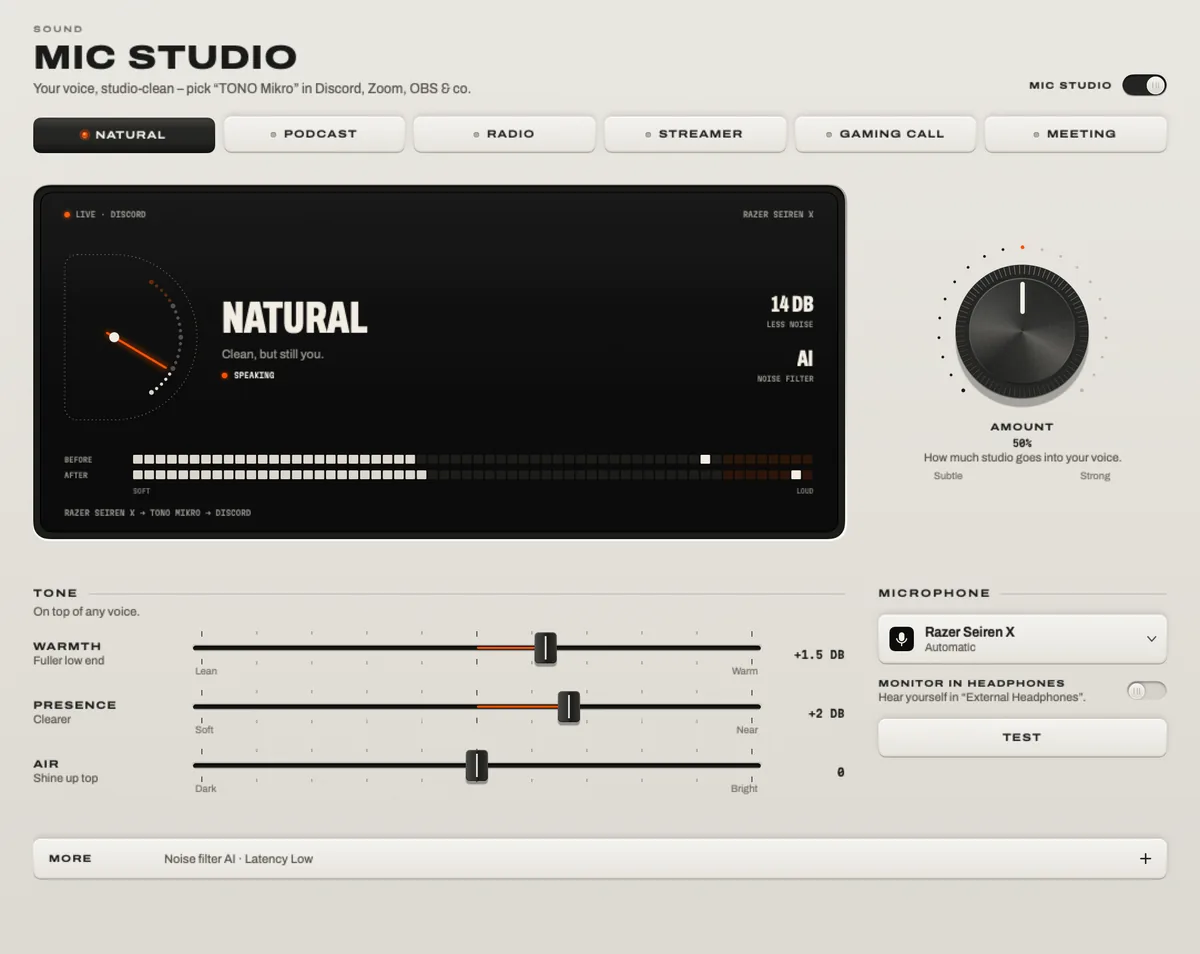
TONO’s Mic Studio cleans your microphone live and passes it on as a new microphone, “TONO Mikro”. Pick it in Discord, Zoom, Teams, OBS or the browser, and the keyboard, the fan and the street fall away – with an AI noise filter that runs on your Mac, six ready-made voices and a limiter that keeps you from clipping. It works with any mic: the built-in one, a USB mic or a headset.

Mic Studio
TONO Mikro
Your voice, cleaned live – as a microphone every app can pick.
TONO 2.3.0macOS 15+Apple siliconProUpdated
How it works
Your microphone goes into TONO, through a voice chain, and comes out as the virtual microphone TONO Mikro. Apps pick TONO Mikro like any other microphone. The chain, in order: a high-pass against rumble, input gain, the noise filter, a gate, tone, a compressor that keeps your level even, a de-esser, an optional effect and a limiter at −1 dBFS.
TONO opens your real microphone only while an app is reading TONO Mikro, and closes it a few seconds after the last one leaves – so the orange mic dot appears only during calls and streams. If TONO quits, TONO Mikro goes silent at once; it never replays old audio.
Two noise filters
- AI uses Apple’s voice-isolation audio unit, running on your Mac. In our offline tests it removed about 40 dB of fan noise and about 50 dB of keyboard clatter; it adds about 56 ms of delay – normal for calls.
- Light is TONO’s own spectral filter: gentler on steady noise (about 15 dB less fan noise), with about 11 ms of delay. Good for music or when every millisecond counts.
Nothing is sent anywhere: your voice is processed on your Mac, in memory.
Six voices, then make it yours
- Natural – clean, but still you.
- Podcast – close, warm, even.
- Radio – rich broadcast sound.
- Streamer – present and punchy.
- Gaming Call – no keyboard, no fans.
- Meeting – clear in every call.
All six come out at the same loudness. Turn the Amount knob, add Warmth, Presence or Air, and try the fun effects: radio, telephone, robot, megaphone, hall, echo, deeper or higher.
Hear it before you set it up
Press Test, speak for five seconds and compare before and after – before anything is installed. When you like it, set up TONO Mikro once: it’s a small audio driver that runs in its own process, not a kernel extension, and can be removed again in Mic Studio → More → Technical.
Use it in your apps
- Discord: User Settings → Voice & Video → Input Device → TONO Mikro. Turn Discord’s own noise suppression off or down, so the voice isn’t filtered twice.
- Zoom: Settings → Audio → Microphone → TONO Mikro, and set Zoom’s background noise suppression to low.
- Microsoft Teams: Settings → Devices → Microphone → TONO Mikro.
- OBS: add an Audio Input Capture source and choose TONO Mikro as its device.
- Browser calls (Google Meet and others): choose TONO Mikro in the call’s microphone settings.
The step-by-step guide for Discord, including input sensitivity and mic placement, is How to improve your mic on Discord on Mac.
Mute any mic, everywhere
Control Option Command M mutes your current microphone in every app at once – even mics without a mute switch. That’s part of TONO Free.
At a glance
Mic Studio · TONO 2.3.0
- Output
- The virtual microphone “TONO Mikro”, for Discord, Zoom, Teams, OBS, FaceTime and the browser
- Noise filter
- AI (Apple voice isolation, on device, ≈56 ms) · Light (spectral, ≈11 ms) · off
- Voices
- Natural · Podcast · Radio · Streamer · Gaming Call · Meeting · Amount · Warmth, Presence, Air
- Dynamics
- High-pass · gate · compressor with auto level · de-esser · limiter at −1 dBFS
- Effects
- Radio · telephone · robot · megaphone · hall · echo · deeper · higher
- Mics
- Built-in, USB, headsets and interfaces · left, right or both channels
- Driver
- A small user-space audio driver, installed only when you set up TONO Mikro · removable in the app
- Plan
- TONO Pro · mic mute on Control Option Command M is Free
Free or Pro
Mic Studio is part of TONO Pro – €3.99 a month, €29 a year or €79 once, and TONO starts with one day of Pro on each Mac. Stream Mode and Auto Rules can switch it on for you when OBS starts or a USB mic is plugged in.
Questions
How do I remove background noise from my mic on a Mac?
macOS itself only offers voice isolation inside apps that support it. For every app, route your mic through a noise filter that appears as its own microphone: in TONO, turn on Mic Studio, pick a voice, and choose “TONO Mikro” as the microphone in Discord, Zoom, Teams or OBS.
Should I also use Discord’s or Zoom’s noise suppression?
Use one filter, not two. With TONO Mikro, turn the app’s own noise suppression off or to low. Two filters in a row can make a voice sound thin or choppy.
Will the others hear a delay?
The AI filter adds about 56 ms, Light about 11 ms. Calls usually have more than that already, so people don’t notice. For singing or playing an instrument live, use Light or no filter.
Is my voice sent to a server?
No. The noise filter and every other step run on your Mac. TONO has no account, no analytics and no cloud processing.
Is TONO Mikro a kernel extension?
No. It’s an audio server plug-in – the kind of driver macOS runs in user space for virtual audio devices – installed only when you set up Mic Studio. You can remove it in Mic Studio → More → Technical.
Turn up your Mac.
Download free. All of Pro for one day. No account.
Download for Mac Hear it first
Free to keepPro from €3.99 a monthmacOS 15+Apple silicon