Feature · Sound
A volume fader and an output for every app
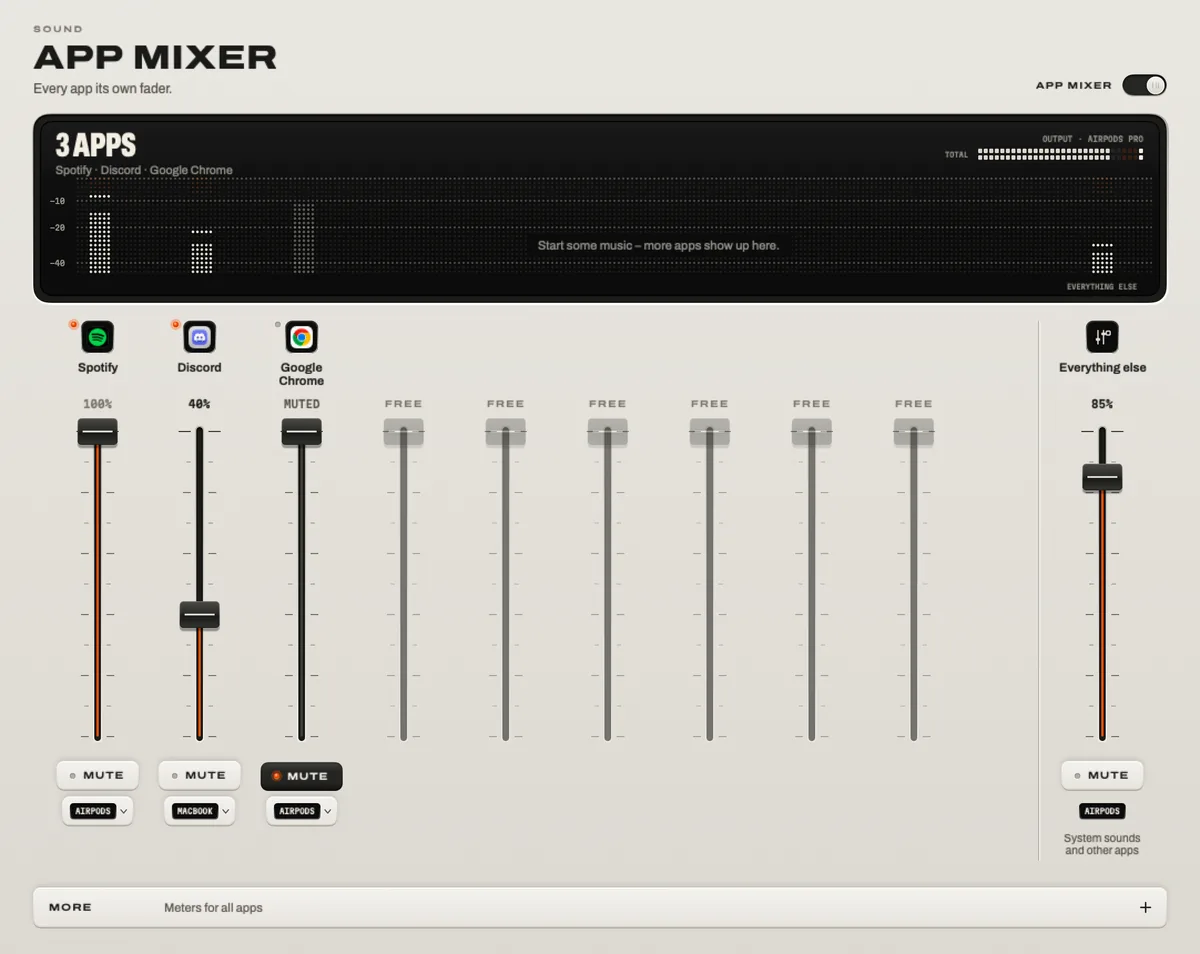
macOS has one volume slider for everything. TONO’s App Mixer gives every app its own fader, mute key and output: Discord quieter than the game, Chrome muted, Spotify on the speakers while the call stays in your headphones. TONO remembers each app’s settings, and when you quit it, every app plays exactly as before.

App Mixer
Per app
A fader, a mute key and an output for every app that plays.
TONO 2.3.0macOS 15+Apple siliconProUpdated
What the App Mixer does
- A fader per app. Turn one app down without touching the others – the game stays loud, the voice chat sits under it.
- Mute per app. Silence the browser’s autoplay or an app’s notification sounds and keep the music.
- An output per app. Send an app to another device: speakers, headphones, a USB interface, HDMI, AirPlay.
- A meter per app. You see at a glance which app is making the noise.
- TONO’s sound per app. Switch the equalizer and 3D off for a single app – voice chats stay natural while the music gets the full treatment.
- Remembered. Settings stay with the app while it’s closed and come back when it plays again.
- In the menu bar. Three strips for the apps that are playing, one click away.
An optional Auto Rule can switch TONO’s sound off while Logic Pro, Ableton Live or another audio app is open.
How it works
TONO takes each app’s sound with its own Core Audio process tap – the macOS interface for capturing other apps’ audio, available since macOS 14.2 – and mixes the strips before the equalizer and the limiter. Apps you send to another device play through their own path to that device. No virtual audio device is involved and you don’t change anything in the apps.
When you quit TONO, the taps end and macOS plays every app as before – on its original device, at its original volume.
Everyday setups
- Gaming and streaming: the game on the speakers, Discord in your headset, each at its own level.
- Work calls: Zoom or Teams in your AirPods, the music quietly on the desk speakers.
- Browsing: Chrome muted while Spotify keeps playing.
- DJ practice: the DJ app on the speakers, a tutorial video only in your headphones.
Step-by-step instructions are in the guide How to set per-app volume on Mac.
Good to know
- Apps sent to speakers, HDMI, DisplayPort or AirPlay get TONO’s equalizer but not 3D or 8D, which are made for headphones.
- When more apps play at once than the mixer has channels, the rest play together over “Everything else”, and TONO says so.
- Apps that play to a Multi-Output Device you built in Audio MIDI Setup aren’t processed.
- There is one TONO sound for all apps; you can switch it off per app, but not give each app its own equalizer curve.
At a glance
App Mixer · TONO 2.3.0
- Per app
- Volume · mute · level meter · output device · TONO sound on or off
- Outputs
- Any output macOS offers: built-in speakers, headphones, Bluetooth, USB, HDMI, DisplayPort, AirPlay
- Memory
- Settings stay with the app while it’s closed
- Menu bar
- Three strips for the apps that are playing
- How
- Core Audio process taps per app · no virtual device · quitting TONO restores everything
- Plan
- TONO Pro · one day free with every download
Free or Pro
The App Mixer is part of TONO Pro – €3.99 a month, €29 a year or €79 once, and TONO starts with one day of Pro on each Mac. TONO Free keeps the equalizer with its 60+ presets, brightness and the everyday tools.
Questions
Can macOS set the volume per app?
No. macOS has one output volume for everything; some apps have their own volume slider inside the app. An app mixer like TONO’s adds a fader for every app in one place.
Can I play one app on the speakers and another on headphones?
Yes. Give each app its own output in the App Mixer – for example Spotify on the speakers and Discord in your headphones. TONO switches it live, without restarting the apps.
Do I need BlackHole, Loopback or a virtual audio device?
No. TONO uses the process taps built into macOS, so there’s no virtual device to install or pick as your output.
Does it work with Discord, Zoom, Teams and games?
Yes – with any app that plays sound on your Mac. Calls can keep a natural sound by switching TONO’s sound off for that app, while music and games get the equalizer and 3D.
What happens when I quit TONO?
Everything plays as before, on the original device and at the original volume. TONO only holds each app’s sound while it runs – even after a crash, macOS gives it back at once.
Turn up your Mac.
Download free. All of Pro for one day. No account.
Download for Mac Hear it first
Free to keepPro from €3.99 a monthmacOS 15+Apple silicon