Feature · Sound
Record what your Mac plays
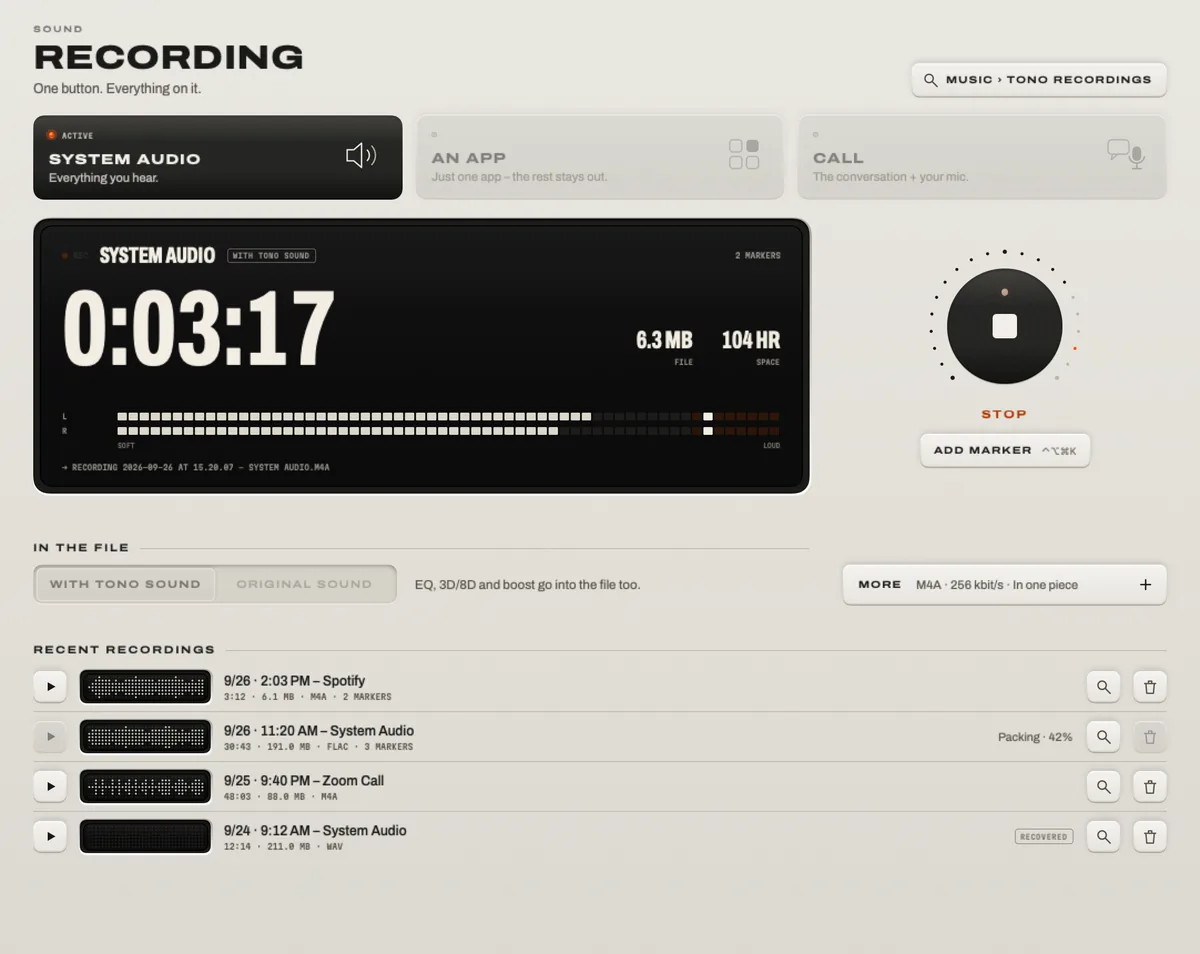
macOS can’t record its own sound out of the box – QuickTime’s audio recording only hears microphones. TONO records system audio, a single app, or a call with one button, or with Control Option Command R from any app, straight to M4A, WAV or FLAC on your Mac. In a call recording you’re on the left channel and everyone else on the right, ready to edit.

Recording
REC
System audio, one app or a call – straight to a file on your Mac.
TONO 2.3.0macOS 15+Apple siliconProUpdated
Three sources
- System audio – everything that plays on your output. Record it with TONO’s sound (equalizer, 3D) or as the original, the way the apps play it.
- One app – only that app goes into the file, wherever it plays: a browser, a DJ app, a game. Notifications and other apps stay out.
- Call – the call app (or all apps) plus your microphone. Mixed into one stereo file, or separate: you on the left, the others on the right – perfect for editing a podcast or an interview.
Formats
- M4A (AAC, 256 kbit/s) – small, plays everywhere, about 2 MB per minute.
- WAV 24-bit or 32-bit float – uncompressed, ideal for editing, about 1 GB per hour.
- FLAC 24-bit – lossless and about half the size of WAV.
Made for long takes
- Markers on a key: Control Option Command K from any app marks the spot. WAV files carry them inside; every format also gets a label file that Audacity imports.
- Split automatically every 30 or 60 minutes, at an exact sample, for DJ sets and long streams.
- Crash-safe: the file is written as you record. If the Mac crashes or the power goes, TONO recovers the take at the next launch.
- Safe stops: a full disk, a disconnected drive or the Mac going to sleep end the recording cleanly and keep what you have.
Privacy and consent
Nothing is captured before you press record, and recordings stay on your Mac – in your Music folder unless you choose another. The microphone opens only for a call recording, and macOS shows its orange dot while it’s on.
Before you record a callIn many countries, including Germany, recording a conversation needs the consent of everyone in it. Ask first. Recordings of music and video are for your private use; respect the rights of the people who made them.
Limits
- Copy-protected streams (some video services) can come through as silence; TONO tells you when a recording stays silent.
- There is no pause button yet – stop and start a new file, or use a marker.
- “One app” records the app at full volume, not at its level in the App Mixer.
At a glance
Recording · TONO 2.3.0
- Sources
- System audio (with TONO’s sound or original) · one app · a call with your mic, mixed or split left/right
- Formats
- M4A (AAC 256 kbit/s) · WAV 24-bit or 32-bit float · FLAC 24-bit
- Long takes
- Markers (Control Option Command K) · auto-split every 30 or 60 min · crash recovery · safe stop on full disk and sleep
- Start and stop
- The REC key, the menu bar, or Control Option Command R from any app
- Where
- Your Music folder or a folder you choose · nothing is uploaded
- Needs
- No BlackHole, no Loopback, no virtual device · the microphone only for calls
- Plan
- TONO Pro · one day free with every download
Free or Pro
Recording is part of TONO Pro: €3.99 a month, €29 a year or €79 once. TONO starts with one day of Pro on each Mac, so you can record your next call or set right away. You can also try the recorder in the landing page demo: it records ten seconds of what you hear as a real WAV.
Questions
How do I record internal audio on a Mac?
macOS has no built-in way to record what it plays. With TONO, open Recording, choose System audio and press REC (or Control Option Command R). The file lands in your Music folder when you stop. No virtual audio device or change of your output is needed.
Can I record just one app?
Yes. Choose One app and pick it – for example your browser or a DJ app. Only that app goes into the file, even if it plays on another device.
Can I record a Zoom, Teams or Discord call with my own voice?
Yes. Choose Call: TONO records the call app and your microphone, mixed or on separate channels (you left, the others right). Make sure everyone agrees to being recorded.
Do I need BlackHole or Soundflower?
No. TONO records through Core Audio process taps, which macOS has provided since version 14.2. You keep your normal output, and nothing extra is installed.
Does TONO record in the background?
No. Recording starts only when you press the key or its shortcut, and TONO shows it in the window and the menu bar while it runs.
Turn up your Mac.
Download free. All of Pro for one day. No account.
Download for Mac Hear it first
Free to keepPro from €3.99 a monthmacOS 15+Apple silicon