Feature · Sound
A music visualizer for everything your Mac plays
Most visualizers either listen through the microphone or work with one player only. TONO’s Visualizer reads the sound it already plays, so it reacts to Spotify, Apple Music, YouTube or a DJ app – no microphone, no extra routing. It finds the kick, the snare and the drop and draws the show on the beat: full screen on a second display, in a mini window, or as a live wallpaper behind your windows.

Visualizer
6 looks
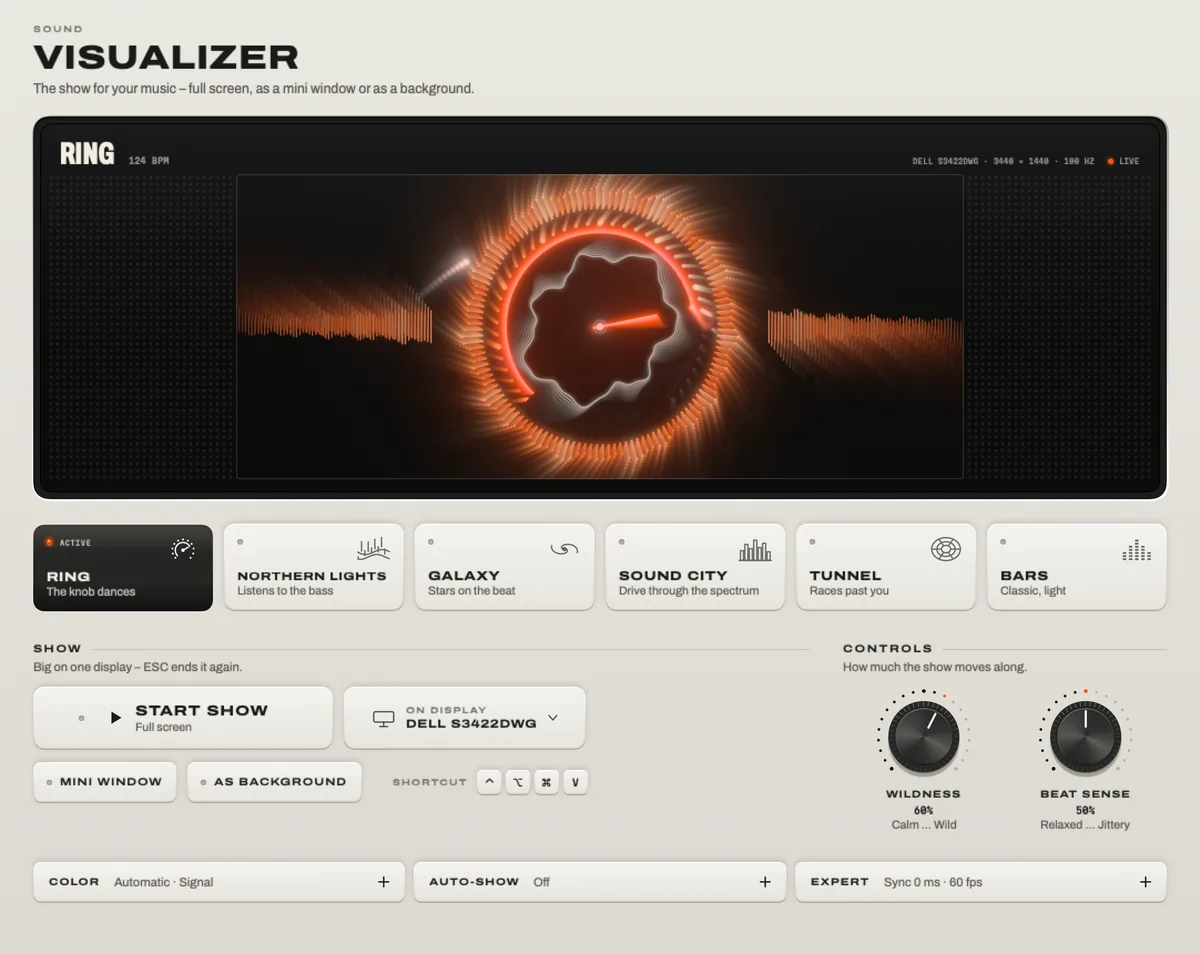
Ring, Northern Lights, Galaxy, Sound City, Tunnel, Bars.
TONO 2.3.0macOS 15+Apple siliconProUpdated
Six looks
- Ring – the TONO knob dances to the music.
- Northern Lights – aurora curtains that listen to the bass.
- Galaxy – a quarter of a million stars on the beat.
- Sound City – drive through your spectrum.
- Tunnel – your music races past you.
- Bars – classic, and light on the graphics chip.
Seven color themes – Automatic, Signal, Phosphor, Ember, Ice, Aurora and Mono – and a wildness and beat-sensitivity setting for each show.
Three places to show it
- Full screen on any display – the second screen at a party, the projector at a gig. Escape ends it.
- Mini window that floats above your work, snaps to a corner and never steals focus.
- Background: a live wallpaper behind your windows and desktop icons, click-through, paused while it’s covered.
On the beat – even over Bluetooth
Because the Visualizer reads the signal itself, it knows what’s coming before you hear it. Bluetooth headphones and speakers play late, so TONO shifts the show by their delay – and a fader corrects the rest by ear. Flashes are limited and the show follows macOS’s Reduce Motion setting.
Auto-Show
Like a screensaver with a pulse: when you haven’t touched the Mac for a few minutes (you choose how many) and music is playing, the show can start by itself; any key ends it. It stays off while a video or a game is in front.
Easy on the Mac
The looks run on the graphics chip with Metal, at 30 or 60 frames per second or as fast as the display allows. Saver quality keeps a laptop cool, and outputs that nobody can see draw nothing.
At a glance
Visualizer · TONO 2.3.0
- Looks
- Ring · Northern Lights · Galaxy · Sound City · Tunnel · Bars
- Themes
- Automatic · Signal · Phosphor · Ember · Ice · Aurora · Mono
- Outputs
- Full screen on any display · mini window · live wallpaper · preview
- Input
- The sound TONO plays – no microphone · beat and drop detection · Bluetooth delay offset
- Comfort
- Flash limit · follows Reduce Motion · 30 / 60 / max fps · Saver quality
- Start
- From TONO, the menu bar, Control Option Command V, an Auto Rule or Auto-Show
- Plan
- TONO Pro · one day free with every download
Free or Pro
The Visualizer is part of TONO Pro: €3.99 a month, €29 a year or €79 once. See a preview right now in the landing page’s visualizer scene – it switches between Ring and Bars and follows the in-browser demo when it plays.
Questions
Does the visualizer need microphone access?
No. It reads the sound that TONO already processes for your output, so it reacts to the music itself, not to the room – and nothing extra is asked for.
Does it work with Spotify and Apple Music?
Yes, and with anything else that plays on your Mac: YouTube, SoundCloud in the browser, DJ apps, games.
Can I show it on a second screen or a projector?
Yes. Start the full-screen show on any connected display, and keep working on the other one.
Will it drain my battery?
A full-screen show uses the graphics chip like a game would. Choose Saver quality or 30 fps on battery; TONO draws nothing for outputs that are covered.
Turn up your Mac.
Download free. All of Pro for one day. No account.
Download for Mac Hear it first
Free to keepPro from €3.99 a monthmacOS 15+Apple silicon