Guide · 3 min read
How to get 8D audio on Mac
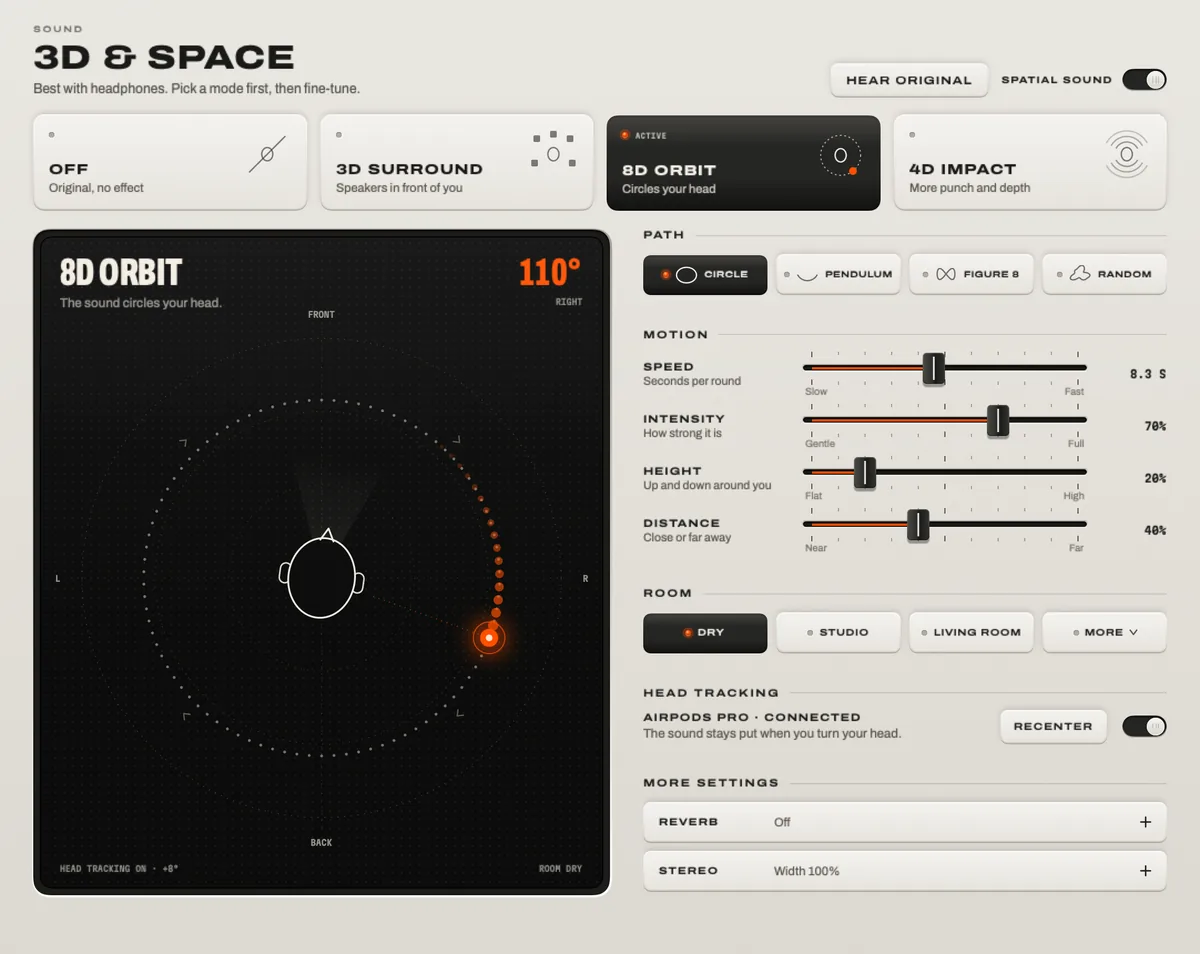
There are two ways. You can play a song someone already converted – search for “8D audio” on YouTube or in your music app. Or you can turn 8D on for anything you play: in TONO, open 3D & Space, choose 8D Orbit and put on headphones. The second works for every song, video and game, and you choose the path, the speed and the distance.

8D Orbit
8–12 s
A round: movement without the dizziness. Speed it up for the drops.
TONO 2.3.0macOS 15+Apple siliconUpdated
What you need
- Headphones. Any kind: wired, Bluetooth, AirPods, in-ear or over-ear. On speakers the effect mostly disappears, because both speakers reach both ears.
- A Mac with Apple silicon and macOS 15 or later for TONO. Pre-made 8D songs play on any Mac.
Option 1: play a pre-made 8D version
Search for “8D audio” plus the song title on YouTube or in your music app. It costs nothing and needs nothing installed. The catch: someone rendered that one song once, with a fixed path and speed, often re-encoded at streaming quality – and your favorite song may not exist in 8D.
Option 2: make anything 8D, live
- Download TONO, open it and switch the sound on. macOS asks once for the permission it calls “Screen & System Audio Recording”.
- Put on headphones and play anything – Spotify, Apple Music, YouTube, a game.
- Open 3D & Space and choose 8D Orbit – or press Control Option Command 8 from any app.
- Choose a path: circle is the classic 8D, pendulum swings from ear to ear, figure 8 passes behind your head, drift wanders slowly.
- Set the speed in seconds per round. Slower is calmer and easier to listen to for a long time.
- Set the distance and a room – near and dry sounds intimate, far with the Concert Hall sounds big.
- Hold HEAR ORIGINAL to hear the difference, and save what you like as a preset.
Settings that sound best
- Start slow. A round of 8 to 12 seconds feels like movement without making you dizzy; speed it up for drops.
- Pick the right music. Electronic, ambient and vocal-driven songs work best. Spoken podcasts are more tiring in 8D – try 3D Surround instead.
- Try the presets: 8D Slow Dream, 8D Pendulum and 8D Figure 8 are ready-made starting points.
- With AirPods Pro or Max, switch on head tracking: the circle stays put in the room while you turn your head.
- Mind the volume. Movement makes music feel louder; TONO’s free Hearing Guard keeps an eye on your daily dose.
Try it without installing anything
The demo on TONO’s landing page runs in your browser: put on headphones, press play, switch on 8D and drag the source around the stage.
Questions
Is 8D audio free on Mac?
Pre-made 8D songs on YouTube are free. Live 8D for any app is part of TONO Pro; TONO starts with one day of Pro on each Mac, so you can try it free.
Why doesn’t 8D work on my speakers?
8D is rendered for two separate ears. With speakers, each ear hears both speakers, which cancels most of the effect. Use headphones.
What’s the difference between 3D, 8D and spatial audio?
3D places the music in front of you, like speakers in a room. 8D moves it around your head. Spatial audio is the general term, and also Apple’s name for its own implementation on AirPods. TONO offers 3D Surround, 8D Orbit and 4D Impact for any headphones.
Can I make the 8D effect slower or less intense?
Yes. Set more seconds per round, choose the pendulum or drift path, or move the source further away.
Turn up your Mac.
Download free. All of Pro for one day. No account.
Download for Mac Hear it first
Free to keepPro from €3.99 a monthmacOS 15+Apple silicon